AI CRM KPI Tracking Guide for Bloggers on a Budget
Struggling to track growth? This AI CRM KPI tracking guide helps bloggers and SEO pros automate insights, save money, and grow traffic with confidence fast.
TECHNOLOGYAI MARKETING AUTOMATION FOR SOLOPRENEURS
The TAS Vibe
1/15/202650 min read
My post content
The Future of AI Automation in 2026: Trends, Tools, and What Smart Marketers Must Prepare For
Introduction: From “What Works Now” to “What Will Win in 2026”

If Modules 1–5 of this series were about mastering the present, then Module 6 is about owning the future.
Up to this point on The TAS Vibe, we’ve walked through what actually works today—not theory, not hype:
Module 1 broke down the right AI tools and platforms worth your time
Module 2 showed practical automation workflows that save hours, not add complexity
Module 3 focused on AI systems that move real KPIs—traffic, leads, conversions
Module 4 delivered real-world case studies and proof of results
Module 5 taught you how to track performance using meaningful KPIs instead of vanity metrics
Together, these modules helped you build efficiency, consistency, and measurable growth.
But here’s the truth most marketers won’t tell you:
What works now will not be enough by 2026.
And that’s exactly why Module 6 exists.
This is the future-proofing chapter—the part of the journey where you stop reacting to trends and start building systems designed for what’s coming next.
Mind Map
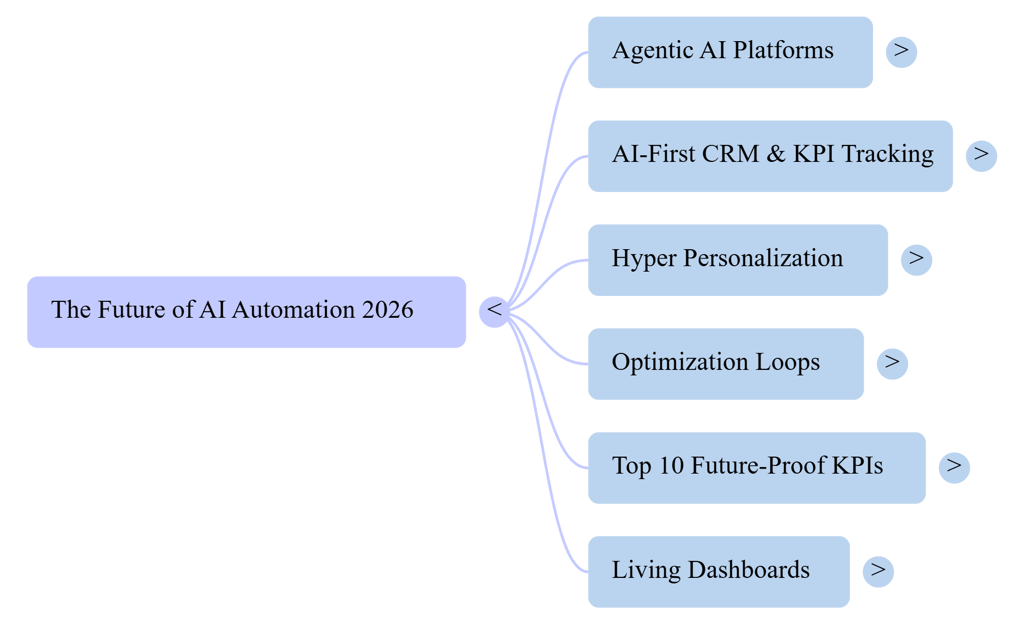
Audio Overview
Why 2026 Is the Real Tipping Point (Not “Someday”)
2026 won’t arrive quietly.
It will be the year where AI stops being a “tool” and starts behaving like a digital team member—making decisions, optimizing workflows, and learning from performance data without constant human input.
Three massive shifts will define this transition.
1. Agentic AI Will Run Full Marketing Workflows End-to-End
Right now, most creators use AI in pieces:
One tool for content
Another for email
Another for analytics
A dashboard full of disconnected data
By 2026, that model will feel outdated.
Agentic AI—AI systems that can plan, execute, evaluate, and optimize tasks on their own—will manage entire workflows from start to finish.
That means:
AI identifies content opportunities based on traffic and CTR trends
It creates, tests, and refines content automatically
It distributes that content across channels
It monitors conversions, bounce rate, and revenue impact
It adjusts strategy without waiting for manual instructions
For solopreneurs and bloggers, this isn’t scary—it’s liberating.
Instead of doing everything, your role becomes:
Strategy
Direction
Brand voice
Final decision-making
The execution? Handled by AI systems you’ve trained.
2. CRM + KPI Tracking Will Become AI-First, Not Spreadsheet-First
Spreadsheets had a great run—but their dominance is ending.
By 2026, AI-driven CRM systems will replace manual KPI tracking almost entirely.
Here’s what changes:
Today:
You pull data manually
You compare numbers week to week
You guess why something worked or failed
In 2026:
AI tracks KPIs in real time
It explains why numbers move
It predicts future outcomes
It flags problems before revenue drops
Your CRM won’t just store leads—it will:
Score them automatically
Predict lifetime value
Recommend content and funnel paths
Adjust follow-ups based on behavior
For bloggers and solopreneurs, this means clarity without complexity.
You won’t need to be a data analyst to make smart decisions—AI will translate numbers into plain-language insights.
3. SEO, CTR, and AdSense Optimization Will Be Driven by Continuous AI Testing
Guesswork in SEO is already dying—and by 2026, it will be gone.
Search engines are evolving faster than manual optimization can keep up with. The winners will be creators who use continuous AI testing, not one-time optimization.
AI will handle:
Title and meta description testing for CTR
Internal linking optimization
Content structure updates based on SERP shifts
AdSense placement and layout experiments
Page speed and UX improvements
Instead of updating posts once every few months, AI will:
Test variations automatically
Learn from user behavior
Apply changes at scale
This means higher:
Click-through rates
Session duration
Ad revenue
Search visibility
All without constant manual effort.
The Core Promise of Module 6
Module 6 is not about predicting the future—it’s about preparing for it.
The promise is simple:
If you set up your AI CRM, KPI tracking, content systems, and funnels today, you won’t need to scramble tomorrow.
This module shows you how to:
Design AI-ready systems now
Avoid rebuilding everything later
Stay competitive even as platforms change
It’s not about chasing every new tool—it’s about building flexible foundations.
Your Personal AI CRM KPI Tracking Guide for the Next 12–24 Months
Think of this article—and this module—as your personal roadmap.
Not for:
Enterprise teams
VC-funded startups
Massive agencies
But specifically for:
Solopreneurs
Bloggers
Niche creators
Small digital brands
Over the next 12–24 months, the gap between creators who prepare and those who react will widen dramatically.
Those who adapt early will:
Publish less but earn more
Track fewer metrics but gain deeper insights
Spend less time managing tools and more time building brands
This guide exists to make sure you’re on the right side of that gap.
Final Thought
Module 6 isn’t about fear of the future.
It’s about confidence.
Confidence that:
Your systems won’t break when platforms change
Your KPIs will still make sense
Your growth won’t depend on hustle alone
At The TAS Vibe, we don’t just teach what works—we prepare you for what wins next.
And 2026 belongs to creators who start preparing now.
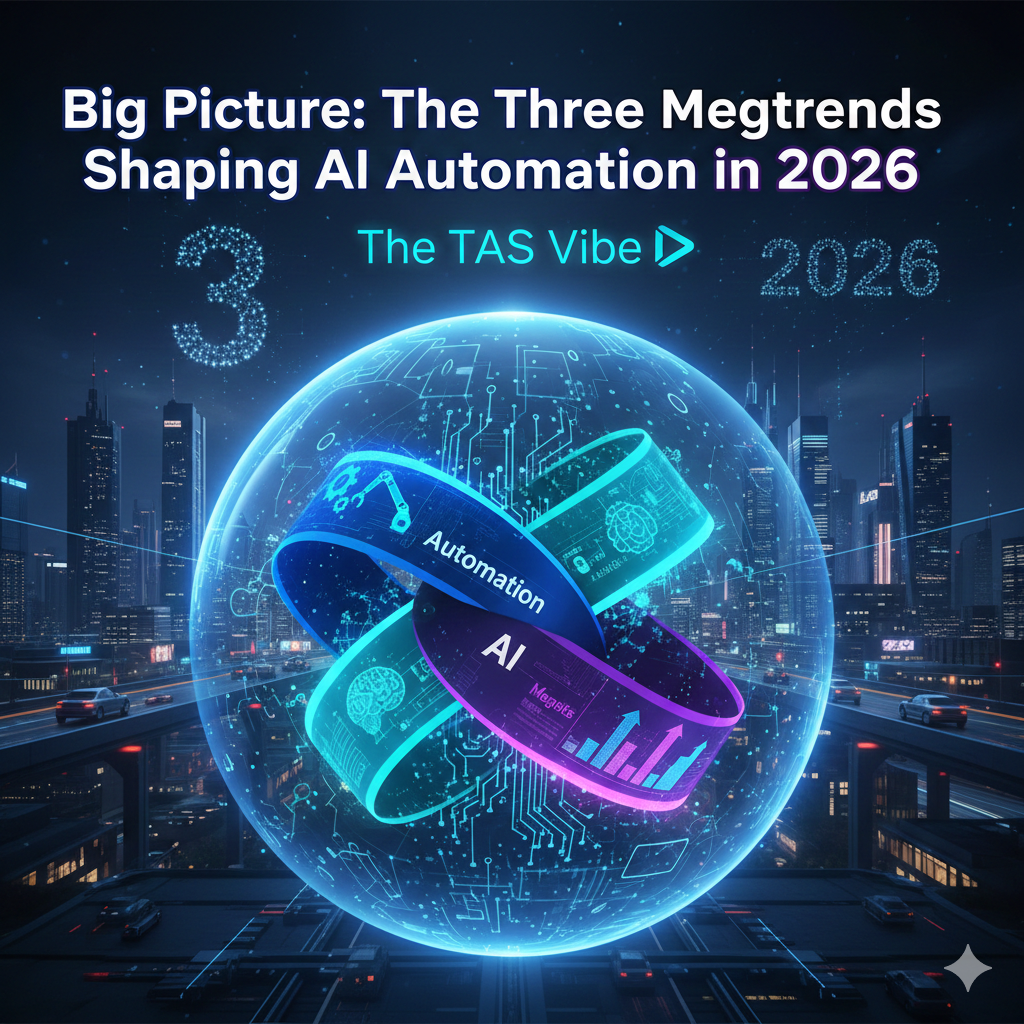
Big Picture: The Three Megatrends Shaping AI Automation in 2026
Agentic AI Platforms: From “Assistants” to Autonomous Marketers
How agentic AI is transforming solo businesses into powerhouse marketing machines
In 2026, we’re witnessing a seismic shift in how digital marketing gets done. Gone are the days when AI lived only in chat windows or helped you draft a few social posts. Today, a new breed of AI — agentic AI platforms — is emerging, capable of thinking, acting, learning, and optimizing without human button-pushing at every step. This isn’t future talk — it’s happening now.
Let’s break down how this evolution works, why it matters, and how one-person brands can use it to outpace larger competitors.
🚀 What “Agentic AI” REALLY Means
In plain English, agentic AI refers to artificial intelligence that doesn’t just respond to prompts — it acts autonomously toward goals across multiple tools and channels.
Traditional AI assistants (think: “write me a caption”) wait for instructions. But agentic AI:
✔ Makes decisions independently
✔ Acts across systems like CRM, ads, email, analytics
✔ Learns from outcomes and optimizes performance
✔ Doesn’t need a human to push every button
This means your AI can sense data, think, plan, and execute — much like hiring a digital assistant that works 24/7 without breaks.
🧠 From Passive Helpers to Active Marketers
Let’s contrast the old and the new:
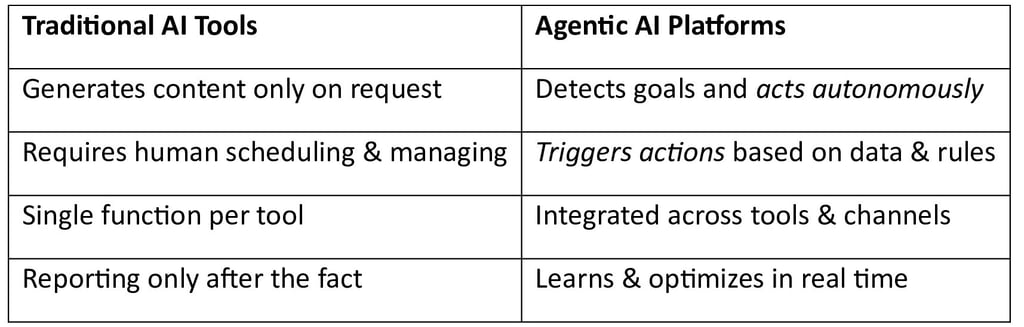
This leap — from assistants to agents — is what makes agentic AI revolutionary.
📌 Realistic Examples for Solopreneurs
You don’t need a marketing department to benefit. Here are concrete ways one-person businesses can leverage agentic AI today:
🔹 Sweep — AI Built for Go-To-Market Workflows
Platforms like Sweep embed AI agents into tools you already use (like Salesforce, HubSpot, etc.). These agents don’t just monitor — they:
✔ Read CRM and pipeline data in real time
✔ Detect stalled deals or missing follow-ups
✔ Send automated alerts, Slack updates, or task reminders
✔ Keep your data fresh without manual touches
This means less time dragging spreadsheets and more time closing deals.
🔹 Pomelli — The Brand-Driven Campaign Generator
Pomelli is one of the most talked-about emerging tools in AI marketing. It automatically:
✔ Crawls your website to extract brand identity — tone, visuals, messaging
✔ Generates tailored social posts, ads, and campaign ideas
✔ Produces platform-ready creatives (Instagram, Facebook, email, etc.)
In short, you give it your website and goals — the AI builds campaign assets that feel like they came from your brain.
(Note: Pomelli currently generates assets you edit — but the trajectory clearly points to deeper automation soon.)
🔹 Other Agentic AI Use Cases
Here’s what else agentic AI can do right now for solo founders and creatives:
Auto-trigger emails after specific user behavior
Pause underperforming ads and reallocate budget automatically
Optimize customer journeys based on performance signals
Generate multi-format campaign assets without repeated prompts
These are tasks that used to take weeks or full teams — now done by an AI agent.
🛠️ How Day-to-Day Work Will Change
Agentic AI shifts your role from “operator” to “strategist.”
Here’s how your marketing workflow evolves:
From:
✔ Logging into 10 different dashboards
✔ Writing copy manually
✔ Testing ads by hand
✔ Updating spreadsheets
To:
🎯 Setting goals (“increase lead signup by 15%”)
📊 Approving high-level AI recommendations
👀 Supervising autonomous agents
🔁 Reviewing performance and fine-tuning strategy
In other words: your time becomes supervisory and strategic, not operational.
🧠 Why This Is Perfect for Solo Businesses
If you’re a solopreneur, a one-person brand, or run a micro-agency, agentic AI is tailor-made for you because:
📍 You don’t have time
Managing every metric, campaign, email, and post manually steals hours every day — agentic AI eliminates that.
📍 You don’t need deep technical skills
AI agents plug into your tools and do the heavy lifting — no coding required.
📍 You stay in control
You set goals and guard the creative direction — the AI executes and optimizes.
📍 You scale without scaling costs
One AI agent equals what used to require an assistant, a designer, and an analyst — all in a fraction of the cost.
Simply put: agentic AI turns small teams into big-league players.
🧠 Final Takeaway
Agentic AI is not a buzzword — it’s the next evolutionary stage of marketing automation. Instead of reactive assistants that wait for prompts, we now have systems that think, decide, and act autonomously toward your business goals.
For one-person businesses, this means:
✨ More output with less input
✨ Faster learning loops
✨ Campaigns that adapt to real performance
✨ Less manual busywork
The future of marketing isn’t about tools — it’s about autonomous partners that help you stay competitive without chaos.
Hyper Personalization Using Multimodal Data (Text + Clicks + Voice + Video) in 2026


How AI-driven personalization is transforming CTR, SEO, user engagement, and ad performance
In 2026, personalization has gone far beyond “Dear [First Name]” email tags. Today’s digital landscape uses multimodal data to tailor experiences not just to broad audience segments — but to each user individually, based on how they behave, interact, search, speak, and watch.
From click behavior on blogs to voice queries on smart speakers, from watch time on videos to ad interactions — every signal now feeds into personalization engines.
This isn’t futuristic marketing anymore — this is the new reality for bloggers, SEO experts, and digital storytellers. Let’s unpack exactly what multimodal data is, why it matters for CTR and SEO, and how blogs in 2026 can fully leverage it.
👉 1. What Is Multimodal Data? (Simple, Example-Driven Explanation)
Multimodal data means different types of user signals — not just text, not just clicks — but a combination:
✨ Text
Blog comments
Search queries typed on Google
✨ Clicks
Which links users click
How long they linger before clicking
✨ Voice
Queries from voice assistants (“Hey Siri, find me easy baking recipes”)
✨ Video behavior
How much of a video users watch
Where they rewind or skip
🔹 Real-world Examples
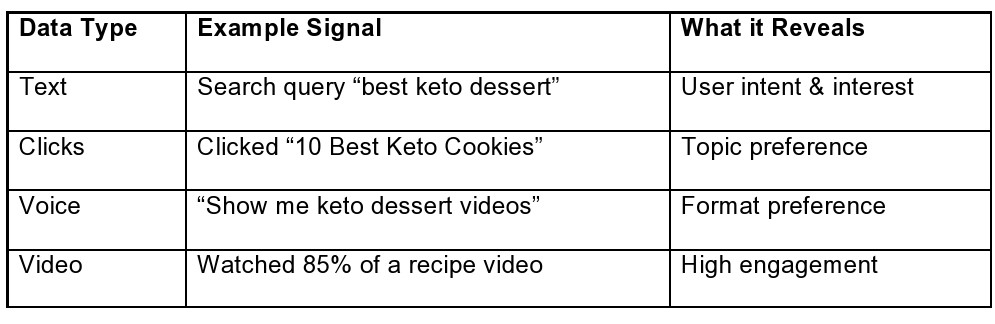
Multimodal personalization taps into all these inputs simultaneously — not in isolation — to learn a user’s preferences more accurately.
👉 2. Why Multimodal Data Is the Next Frontier of Personalization
Most sites still personalize based on one or two signals — like previous click history or demographic data.
In 2026, advances in AI and analytics platforms allow tools to combine:
✔ CRM data (customer database behavior)
✔ Website analytics (time on page, bounce rate)
✔ Ad performance signals (which ad creatives users engaged with)
✔ Video metrics (watch time, replays)
✔ Voice search patterns
Into a single unified customer profile.
Each user becomes a living digital persona — constantly updated in real time.
👉 3. AI Systems That Create Individual-Level Profiles
Modern personalization tools integrate across platforms:
🎯 CRM — what an individual has done before
📊 Website analytics — how they interact now
📢 Ad data — what creatives they engage with
🔊 Voice search logs — how they speak their intent
📺 Video behavior — what content keeps attention
This super-profile lets AI predict:
What topic will hook this user
Which formats they prefer (text vs. video vs. voice)
What call-to-action they’re most likely to respond to
In effect — no two users see exactly the same version of your blog or ads.
👉 4. Practical Personalization Across blog touchpoints
🧠 Personalized Blog Intros
Instead of a static opening line, AI dynamically chooses intros like:
✔ “Welcome back, foodie explorer!”
✔ “If dessert hacks are your thing…”
✔ “Based on your keto search history, you’ll love this…”
That means higher retention right from the first sentence.
🎨 Personalized Thumbnails & Hero Images
Images aren’t just aesthetic anymore — they’re strategic.
➡ A user who watches video clips will see animated thumbnails.
➡ A user who reads long posts will see static, high-contrast images.
➡ A user who engages with listicles sees thumbnails highlighting “Top 10”.
This increases click-through rate (CTR) from the very first impression.
📢 Personalized Ad Creatives
Forget generic banners.
AI systems now pull from multiple data streams to serve:
Text ads that reference past searches
Video ads that align with watch history
Offers timed to user readiness (e.g., subscription vs. purchase intent)
This means higher relevancy + lower ad fatigue.
👉 5. SEO Meets Hyper Personalization
🔎 Personalized Title Tags & Meta Descriptions
Your HTML title and meta description can now change per visitor.
For example:
A user who previously read “budget travel tips” might see:
“Top 15 Affordable Europe Trips in 2026 | Tailored For You”
While a luxury traveler sees:
“Luxury Escapes 2026: Best Premium Destinations”
This doesn’t harm SEO — it enhances CTR from search results, which in turn improves your rankings.
Search engines now reward engaging search snippets, especially when CTR is high.
👉 6. Dynamic CTAs That Move Users Forward
Instead of one static CTA at the end of every post, AI can dynamically adjust CTAs based on:
🟢 User intent
🟡 Engagement level
🔵 Past behavior
Examples:
“Buy the eBook Now” — for users showing high purchase intent
“Save this recipe for later” — for casual browsers
“Watch the full tutorial” — for video lovers
“Subscribe and get your personalized tips” — for habitual readers
This increases conversions while reducing friction.
👉 7. Why This Matters for CTR & Revenue
✅ Users feel understood
✅ Engagement skyrockets
✅ Bounce rates drop
✅ Ad revenue improves
✅ Search rankings improve via higher CTR
By 2026 consumers expect relevant, intelligent content — not generic content.
🚀 Final Takeaway for The TAS Vibe
Hyper personalization isn’t optional — it’s the core competitive advantage.
Multimodal data bridges the gap between what users say, what they click, what they watch, and how they interact.
For bloggers, SEO experts, and content creators — understanding and implementing multimodal personalization is the difference between being noticed and being ignored.
Your blog isn’t just a site anymore — it’s a dynamic, living experience personalized for every visitor.
AI First Optimization Loops Replacing Manual A/B Testing
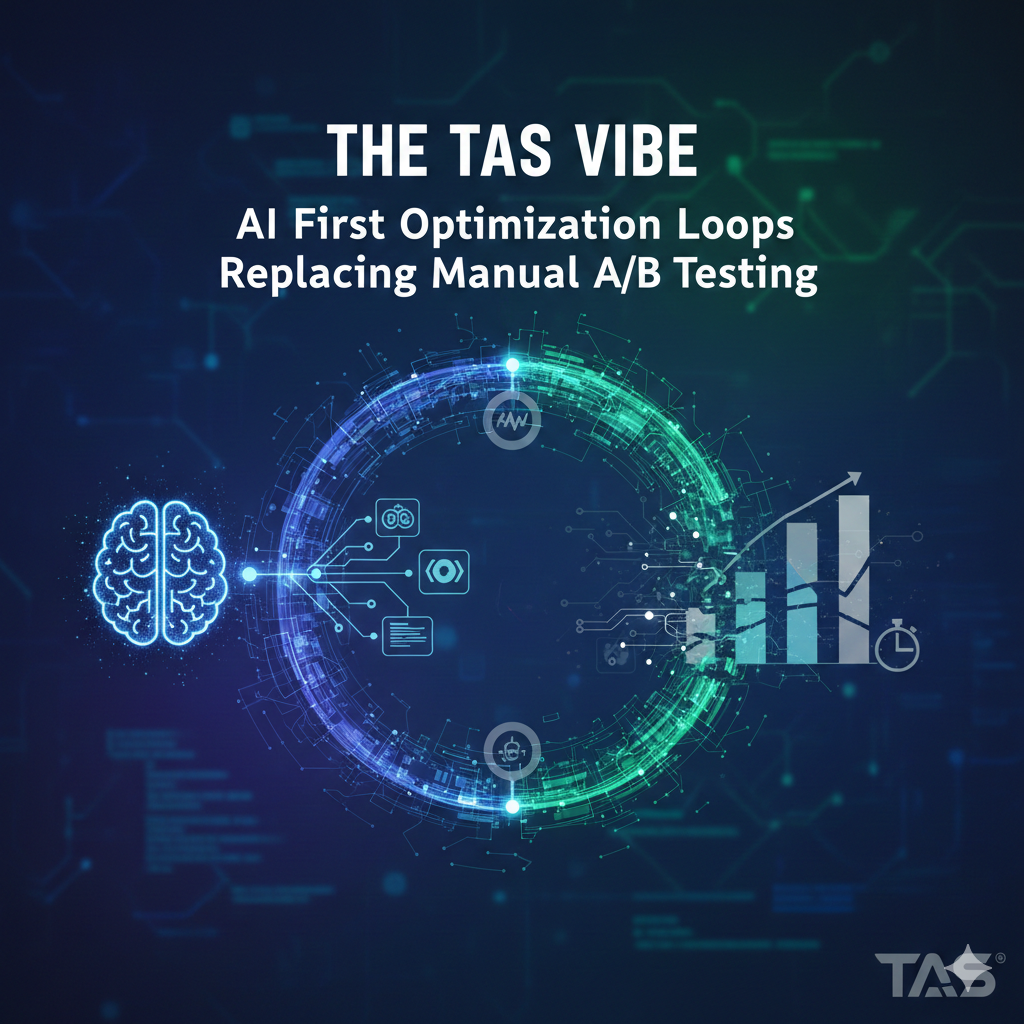
Why the Old School Model Is Dead — and What’s Taking Its Place in 2026
Every serious blogger—and every brand marketer worth their pixels—knows that optimization lies at the heart of performance. But how we optimize has radically shifted.
While most people still think of A/B testing as the gold standard, AI has quietly ushered in a smarter, faster, and more scalable way of optimizing content and ad revenue. Welcome to the era of AI First Optimization Loops.
🧠 The Old Way: Manual A/B Testing (and Why It’s Broken)
For years, the standard operating procedure for bloggers and advertisers has been this:
Design a hypothesis — e.g., “This headline will get more clicks.”
Run two versions — A vs. B.
Split traffic evenly for 10–14 days.
Pick a winner based on limited metrics like CTR or conversion rate.
Repeat with another idea.
Simple, right?
But here’s the catch:
✔️ It takes a long time.
✔️ It only tests one variable at a time.
✔️ It ignores contextual performance shifts (e.g., time of day, device type, user intent).
✔️ It sacrifices speed for certainty — and in modern digital ecosystems, speed wins.
In a world where headlines, thumbnails, and ad creatives can go stale in hours, not days, this old method feels like driving with the brakes on.
🤖 The 2026 Way: AI First Optimization Loops
Picture this instead:
Instead of waiting two weeks for a single winner, your system is constantly learning, generating, testing, and optimizing — in real time.
That’s the essence of the AI First Optimization Loop.
This new framework uses advanced AI methods like multi-armed bandit algorithms, real-time creative generation, and continuous performance feedback loops.
Let’s break it down.
🔄 What Is a Multi-Armed Bandit? (And Why It’s Better Than A/B Testing)
If you’ve ever played a slot machine with multiple levers, you’ve experienced the inspiration behind the term multi-armed bandit.
Instead of:
✔️ Dividing traffic equally between options A and B…
AI systems continuously adapt traffic distribution based on real-time performance.
So if a headline is performing well after 100 views — the AI sends more traffic to it immediately.
This means:
📈 High-CTR versions win faster
💸 Low-engaging variants get dropped sooner
🧠 Every user interaction teaches the model something new
This dynamic shift replaces the static nature of traditional A/B testing.
🧪 AI-Generated Variations: Headlines, Thumbnails, and Ads
One of the biggest game-changers?
AI doesn’t just test what you provide — it creates new options.
✍️ Headlines
AI analyzes:
Keyword engagement patterns
Emotional impact
Historical CTR performance
Then generates new headline variants optimized for:
Search intent
User psychology
Real-time engagement trends
🎨 Thumbnails
AI models analyze:
Color psychology
Visual focus zones
CTR performance of past thumbnails
And auto-produce thumbnails that are fine-tuned for higher engagement across audiences.
📢 Ad Creatives
Instead of static creatives:
AI designs variations
Tests them instantly
Amplifies winners in real time
This means your ad inventory is perpetually improving itself — without manual updates.
📊 The Direct, Measurable Impact
🚀 Higher Click-Through Rates (CTR)
AI algorithms:
Identify winning creative elements faster
Push traffic to top performing versions
Avoid human bias and slow decision loops
Result? Your blog posts and Google Ads show significant lift in CTR — sometimes within hours.
💰 Improved Google AdSense RPM
Traditional testing doesn’t consider combined layout and revenue performance.
AI loops:
Monitor how design and placements influence revenue
Kill low-earning layouts instantly
Reallocate impressions to high-yielding units
The result? RPM climbs faster than ever — and your earnings become predictable.
📌 Future-Facing Concept: Optimization Loop Dashboards
In 2026, optimization is no longer a periodic exercise — it’s now:
🔍 Embedded everywhere
Within your:
CRM
Web analytics stack
Ad platforms
Content management systems
📈 Always active
Instead of quarterly optimization reports, you have live dashboards that show:
Real-time winners
Version performance over time
Revenue impact per creative variant
Statistical confidence shifts
Imagine opening your CRM and instantly seeing:
✔️ Your best headline trends this week
✔️ Which thumbnails are driving the highest engagement
✔️ How RPM is trending across segments
Not by guesswork — but by continuous, autonomous AI loops.
🧩 How to Build Your Own AI Optimization Stack (in 2026)
Here’s a high-level blueprint:
Data Integration Layer
Import analytics data from blog posts, AdSense, and ad platforms.
Ensure real-time ingestion.
AI Generation Module
Use models that generate headlines, visuals, and creative options.
Connect them to your content delivery flows.
Multi-Armed Bandit Engine
Automate traffic allocation.
Continuously learn from user interactions.
Live Optimization Dashboard
Expose KPIs in real time.
Track CTR, bounce rates, revenue shifts, and creative performance.
Feedback Loop
Feed every engagement signal back into the model.
Create ongoing improvement cycles.
🚀 Final Thoughts
Today’s digital landscape punishes slow optimization and rewards adaptation.
While traditional A/B testing had its decade, AI First Optimization Loops are now the engine of growth, engagement, and revenue for bloggers, publishers, and advertisers.
In a world where attention shifts in seconds — why run weeks-long tests?
Let AI learn, adapt, and elevate your content continuously.
That’s the future.
That’s the TAS Vibe.
The Future of AI CRM & KPI Tracking for Solopreneurs (2026)
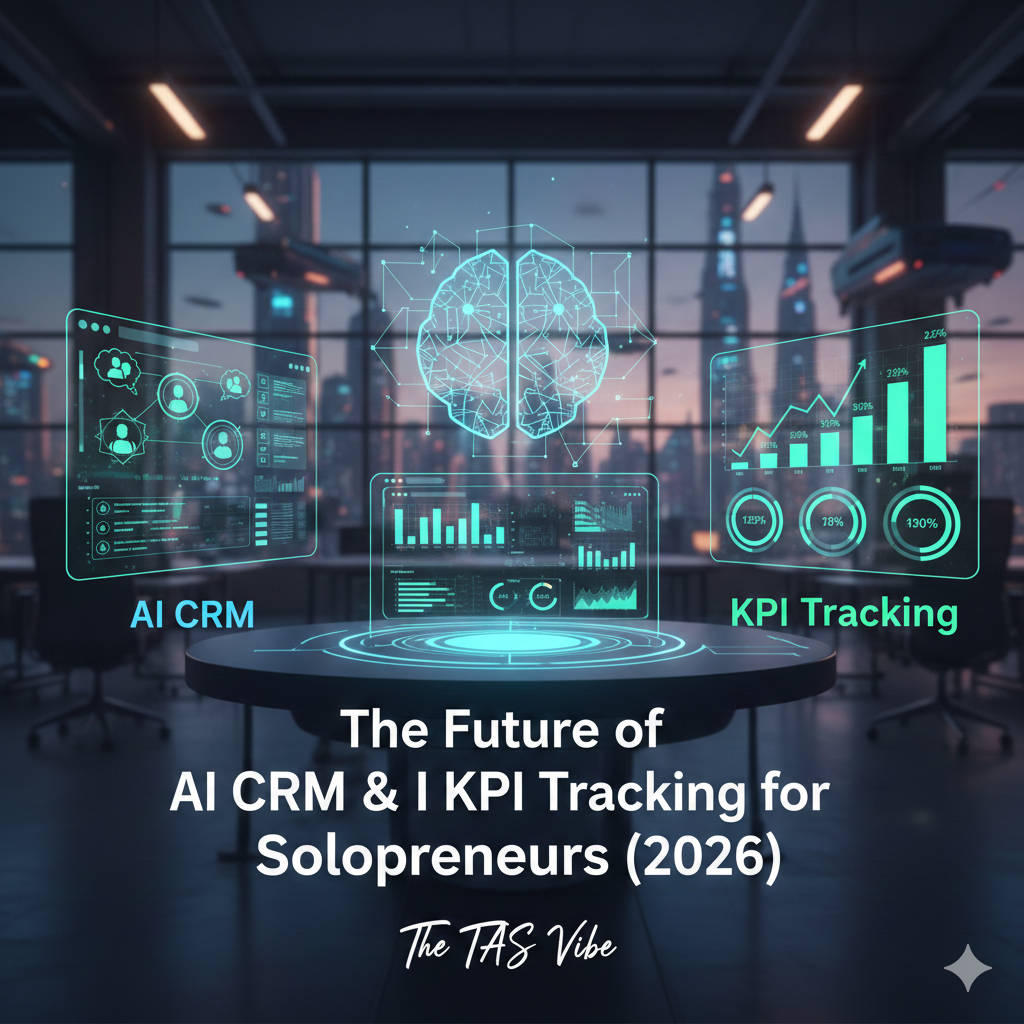
Why CRM + KPI Tracking Becomes Non-Negotiable in 2026
In 2026, the digital landscape is no longer just competitive — it’s intelligent. If you’re a solo creator, digital marketer, or SEO expert, you might think CRMs are “only for big sales teams.” Think again. The future belongs to those who treat data as currency, KPIs as compass points, and CRM systems as control centers for every digital engagement.
Let’s break down why CRM + KPI tracking is no longer optional — it’s mission-critical.
What a CRM Really Is — Even for Solo Creators
A CRM (Customer Relationship Management) system isn’t a bulky enterprise tool anymore. Today’s CRMs are streamlined, AI-enhanced engines that help creators and freelancers:
track audience interactions,
organize leads and subscribers,
automate follow-ups,
and derive actionable insights.
For a solo creator, a CRM is like your central nervous system — not a luxury, but the foundation of smarter growth.
📌 Instead of thinking “CRM = sales teams,” think “CRM = audience lifecycle management.”
Every email, DM, webinar signup, blog click, and repeat visitor becomes data that your CRM can organize and activate.
AI-Driven KPI Tracking: The New Control Center
In 2026, it's no longer enough to just collect data — you must measure, optimize, and anticipate performance in real time.
This is where AI-driven KPI tracking embedded in CRM systems becomes a tactical advantage.
Imagine your CRM telling you:
which email subject lines convert best,
which blog posts generate the most meaningful engagement,
which retargeting ads deliver profitable click-throughs,
and when your AdSense revenue drops before it’s even noticeable.
That level of insight changes strategy into real control.
Let’s explore the key areas where this shift matters most:
1. Email Campaign Mastery
Email is one of the highest-ROI channels — but only when tracked properly.
AI in CRM helps you:
✔ Measure open and click-through rates with context
✔ Predict which subscribers will re-engage
✔ Automate follow-ups based on behavior, not guesswork
✔ Identify spam risks before they hurt deliverability
Your CRM becomes the engine that fuels personalized funnels — not just a list dump.
2. Content Promotion Powered by Signals
You create content — but do you know how it performs across platforms?
Modern CRM + KPI systems let you see:
📌 Which channels drive engagement
📌 What content leads to deeper conversions
📌 Time-of-day posting patterns that actually work
This isn’t vanity metrics — this is signal data, and AI helps you filter the noise.
When content performance ties back to real KPIs, you stop guessing — and start optimizing.
3. Smarter Retargeting — Less Spend, More Precision
Retargeting without CRM insights is like shooting arrows blindfolded.
With KPI data integrated:
you know who clicked,
what they clicked,
and how close they are to a conversion.
This lets AI build microscopic audience segments, such as:
🔥 “Browsed 3 blogs but didn’t subscribe”
🔥 “Opened email twice, didn’t click offer”
🔥 “Clicked ad twice, engaged on site 4+ min”
These micro-behaviors drive targeted sequences that increase ROI and decrease wasted ad dollars.
4. AdSense Optimization That’s Data-Driven
For bloggers and creators relying on ad revenue, true optimization isn’t A/B testing alone — it’s tracking KPIs in context with your CRM.
Your CRM can:
✔ correlate content categories with ad revenue
✔ pinpoint pages that underperform monetarily
✔ show you when and where to push new ads or promotions
✔ track trends over time (not just snapshots)
AI helps find patterns you would never notice manually.
The Competitive Edge: Clean & Well-Labelled Data
Here’s the Golden Rule of 2026:
Whoever owns the cleanest, best-labeled CRM data will extract the most value from agentic AI.
Agentic AI systems don’t just follow instructions — they act on your data. But that’s only valuable if your data is:
✔ organized
✔ accurate
✔ contextually labeled
✔ linked to real KPIs
Messy data? Garbage predictions.
Clean data? Compounding insights.
This is the difference between reactive marketing and autonomous optimization.
Final Thoughts: CRM + KPI = Growth Engine
As we move deeper into 2026, we’re not entering an era of “more tools” — an era of smarter tools.
Your CRM, layered with AI-driven KPI tracking, is the nervous center of your digital ecosystem. From emails to retargeting ads, content performance to AdSense income — every decision becomes:
measurable,
automated,
and intelligence-driven.
👉 For solo creators, digital marketers, and SEO professionals — adopting this combo isn’t just smart. It’s the foundation of future-proof growth.
From Static Reports to Living Dashboards: Your 2026 Command Center


Welcome to 2026, where analytics isn’t just data — it’s actionable intelligence on demand. Whether you’re a digital agency, a small business owner, or a solo blogger earning from AdSense and sponsorships, your success hinges on how quickly you understand performance and turn insights into actions.
Gone are the days of clunky spreadsheets and monthly reports. Today’s marketers live inside AI-enhanced, real-time KPI dashboards that think for them, highlight what matters most, and suggest the next best move with a single click.
In this article, we’ll explore what a modern CRM KPI Dashboard with AI suggestions looks like in 2026 — real-time, intuitive, and built for growth.
What Is a CRM KPI Dashboard With AI Suggestions?
A CRM KPI dashboard is more than a pretty interface — it’s your command center.
At its core, it collects and visualizes your most important performance metrics: open rates, click-through rates (CTR), customer acquisition costs, lifetime value, revenue trends, and more. But in 2026, dashboards have evolved from simple visuals to living systems that think, predict, and guide decisions.
Imagine:
A dashboard that doesn’t just show you that your CTR dipped — it tells you why.
A system that recommends personalized subject lines based on your audience.
One-click buttons that apply changes across platforms (email, social ads, content SEO) instantly.
This is the power of AI-infused dashboards.
Live Metrics That Move With You
Static monthly reports are history. Today’s dashboards are real-time, always-updating engines that reflect the pulse of your business as it happens.
Here are the core elements:
🔹 Real-Time Open Rates
Instead of waiting for daily or weekly recaps, see your email open rates live:
Which audience segments opened most?
What time of day brings the highest engagement?
Is a recent headline test winning or losing?
AI doesn’t just show data — it contextualizes it.
🔹 Dynamic Click-Through Rates (CTR)
CTR now tracks everywhere:
Emails
Sponsored posts
Ad campaigns
Blog link engagement
The dashboard flags anomalies instantly — for example, if mobile CTR drops across all channels, it might suggest an AMP or layout optimization.
🔹 Customer Acquisition Cost (CAC) Live View
Instead of quarterly averages, see CAC update as campaigns run:
Which audience source is most efficient?
Are TikTok micro-videos underperforming compared to community newsletters?
What’s the margin between CAC and average order value right now?
AI segments this automatically, so you know which ads or campaigns are breaking the bank.
🔹 Lifetime Value (LTV) Forecasting
Today’s dashboards don’t just tally lifetime value — they predict future value using historical behavior and engagement trends.
This means:
Recognizing which customer segments are most loyal
Predicting churn before it happens
Offering personalized retention incentives
AI helps you spend smarter and invest where long-term ROI is highest.
AI “Insight Cards” — Your Brainy Shortcuts
Traditional dashboards show numbers. Smart dashboards interpret them.
Enter “Insights” cards — bite-sized narratives generated by AI that explain:
What changed
Why it changed
What you should prioritize next
Examples:
✅ “Your Tuesday morning email had a 22% higher open rate than usual — users who opened also clicked 3x more on your latest blog CTA.”
🔎 “CTR declined by 15% after reducing ad spend on Site B. Consider reallocating budget back or adjusting messaging.”
These cards save you hours of manual analysis — and make data meaningful instead of overwhelming.
One-Click Recommendations That Work
Here’s where the magic really happens:
Your dashboard doesn’t just suggest — it acts.
✨ One-Click “Apply This Suggestion” Buttons
These buttons let you:
Push new email subject lines directly into your next scheduled blast
Apply AI-recommended audience segments in ad platforms
Adjust bids across social ad campaigns in one unified command
No exporting, no switching between tools, no guesswork.
This is actionable analytics — immediately deployed and measurable in real time.
The Standard for Every Content Creator and Marketer in 2026
So who needs this next-generation dashboard?
🧠 Agencies
Agencies thrive on performance proof.
Impress clients with real-time transparent metrics
Use AI insights to justify strategy shifts
Provide proactive recommendations instead of reactive reports
Your clients no longer ask, “How did we do last month?” Instead they see, “We’re optimized for tomorrow.”
📈 Small Businesses
Small teams can’t afford complex analytics or expensive analysts.
A living dashboard becomes your virtual data expert
You spend time creating value, not deciphering spreadsheets
AI prioritizes what matters most to your growth
This levels the playing field with larger competitors.
✍️ Solo Bloggers & Content Creators
If you’re building revenue through AdSense, sponsorships, or affiliate marketing:
Track your highest-earning posts in real time
Understand which headlines drive clicks and earnings
Spot trends across social platforms instantly
AI doesn’t just analyze — it teaches, acting like your personal data coach.
Why This Matters in 2026
In today’s attention economy:
Speed matters
Clarity matters
Actionability matters
Static, outdated reports delay decision-making. They bury insights and leave revenue on the table.
With a living dashboard spec’d for 2026:
✔ Data becomes narrative
✔ Insight becomes action
✔ You stay ahead of trends, not behind them
Your Next Step: Activate Your Command Center
Whether you’re:
Switching to a smarter reporting platform,
Upgrading your CRM,
Integrating AI analytics into your workflow,
Or simply wanting to level up your strategy…
The time is now.
Data isn’t just numbers anymore — it’s your command center for action.
And your readers, clients, and audience will thank you for bringing that power to light.
💡 Want a ready-to-use template for your own 2026 KPI dashboard? Just ask — I can create one tailored for bloggers, agencies, or e-commerce!
Deep Dive: The 2026 AI CRM KPI Tracking Guide
How to Track CRM KPIs with AI in 2026 — Complete Guide for SEO & AdSense Growth
In today’s AI-first world, customer relationships are not just managed, they’re intelligently interpreted. CRM systems have evolved beyond manual tagging and spreadsheets — they’re now living data ecosystems powered by AI that understand user intent, predict behaviors, and automatically optimize marketing actions.
For The TAS Vibe audience — bloggers, SEO strategists, and AdSense monetizers — mastering AI-driven CRM KPI tracking is your competitive advantage in 2026.
Let’s unpack how to track CRM KPIs with AI, which data to feed in, how AI clusters users, and how those smart segments influence SEO, AdSense, and conversions.
1. Which Data to Feed Into Your CRM
Your CRM is only as powerful as the data you feed into it. In 2026, the goal isn’t just collection — it’s intelligent, contextual ingestion that fuels AI insights.
Here are the critical data points that give your AI CRM the fuel it needs:
🔹 Search Queries
This includes:
Internal search bar terms on your blog
Queries that brought visitors from search engines
Long-tail questions users ask most
Why it matters: Search queries reveal intent. Feeding these into your CRM lets AI understand what visitors are looking for, not just what they click.
🔹 Landing Page Views
Track which pages users land on from:
Organic search
Paid ads
Social referrals
Key attributes captured:
Entry page URL
Time on page
Scroll depth
Bounce vs engaged visit
AI Benefit: Patterns form — “Users who land on Topic A also tend to read Topic B,” enabling predictive recommendations and segmentation.
🔹 Email Touches
Every email interaction counts:
Opens
Click-throughs
Replies
Unsubscribes
Time spent reading
Why: Email behaviour is one of the strongest engagement indicators in a CRM. It tells AI who cares and who converts.
🔹 Ad Clicks & Sources
Capture:
Which ads were clicked
Ad copy versions clicked
Devices used
Referrers (Google, YouTube, Facebook)
Why: Understanding what ad brought them and how they behave next helps AI connect the dot between paid interest and organic engagement.
🔹 Purchases & Conversions
Track every conversion:
Lead magnet downloads
Shop purchases
Subscription upgrades
Affiliate purchases
This is the hard revenue KPI that all other data points inform.
2. How AI Tags & Clusters Users Automatically
With rich data flowing in, modern AI doesn’t just store it — it interprets, segments, and predicts behaviors. Let’s demystify how that happens.
AI Does Three Things:
1. Pattern Recognition
AI detects patterns humans miss:
Users who read topics 1 & 2 typically buy Product A.
Users who click ads but don’t buy are high intent but low conversion.
2. Smart Tagging
AI assigns dynamic tags like:
“High CTR, Low Purchase”
“AdSense Heavy Reader”
“SEO Keyword Magnet”
“Email Engaged / Frequent Opener”
“Cold but Clicked”
Tags evolve in real-time. If someone starts reading more topics related to buying, their profile shifts.
3. Intelligent Clustering
Instead of static lists, AI creates clusters — groups of users who behave similarly even if they never met the same exact criteria.
Examples:
Cluster A: Reads monetizable content, high time on page, medium CTR — friendly for top AdSense placements
Cluster B: Visits landing pages from organic search, high email opens — ideal for lead magnets
Cluster C: Repeated ad clicks + low purchases — perfect for retargeting flows
3. How AI-Driven Segments Influence Your Strategy
Once AI has clustered users, you can use those insights to actively optimize your SEO, internal linking, content prioritization, and AdSense strategy.
🧠 Internal Linking for SEO
AI clusters tell you where internal linking moves the needle:
Cluster Use Case (Example):
Users with tags:
“SEO Keyword Magnet”
“High Organic Engagement”
These users should be guided toward:
Pillar content
Topic clusters with high search intent
Content that converts (newsletter + lead magnets)
Internal Linking Strategy:
From high-traffic pages → link to deeper topics AI predicts interest for
From informational posts → link to monetizable guides
From trending phrases → link to evergreen pillar pages
SEO Growth Impact:
Smart, AI-powered linking improves:
Session duration
SERP relevance
Topical authority
Which boosts overall organic rankings.
📊 AdSense Placements Based on AI Segments
AI informs which ad zones convert best for each segment.
Segment Example: “AdSense Heavy Readers”
These are users who:
Spend more time on content
Click ads repeatedly
Read multiple articles in one session
AI-guided AdSense Optimization:
✔ Place ads mid-content where engagement peaks
✔ Use high-CTR ad sizes (e.g., 300×250 or responsive sticky ads)
✔ Prioritize ad units for clusters with high ad interaction history
This isn’t guesswork anymore — AI tells you which placement historically works best for each cluster.
📈 Which Lead Magnet to Push
AI segments make your lead magnet promotion wise, targeted, and intelligent.
Let’s highlight how:
Segment: “High Search Intent but Low Conversion”
These users look around but don’t convert.
AI Suggests:
Offer them a high-value, low-barrier lead magnet (e.g., PDF checklist)
Trigger the offer after 30 sec on site or second page visit
Use in-line CTAs and pop-ups dynamically
Segment: “Email Engaged & High Purchase Potential”
They open most emails and read often.
AI Suggests:
Push premium lead magnet + exclusive offer
Personalize subject lines based on past search intent
Result: Higher conversion rates, better email retention, and more loyal readership.
Conclusion: AI CRM KPI Tracking Is Your Secret Weapon in 2026
AI doesn’t replace strategy — it amplifies it. When you systematically track the right CRM KPIs and let AI tag, cluster, and predict behavior, you unlock:
✅ Automated audience understanding
✅ Data-driven SEO internal linking
✅ Personalized AdSense monetization
✅ Intelligent lead magnet delivery
For The TAS Vibe audience, mastering this AI-powered CRM KPI framework means smarter decisions, higher engagement, and real measurable growth in both SEO and revenue.
The Metrics That Will Really Matter: Top 10 Future-Proof KPIs for Bloggers & Digital Marketers
In an age where content is abundant and attention is scarce, the metrics we track determine not just how much traffic we get, but how well that traffic monetizes, engages, and converts. With AI increasingly powering SEO, CTR optimization, and ad revenue intelligence, traditional analytics are evolving fast. By 2026, the smartest creators won’t just look at pageviews—they’ll tap into future-proof KPIs that map directly to revenue growth, audience retention, and predictive engagement outcomes.
This guide decodes the top 10 strategic KPIs that matter most in 2026—why they’re important, what they really mean, and how AI will help you track and optimize them.
Why Traditional Metrics Are No Longer Enough
Bloggers historically looked at metrics like:
Pageviews
Bounce rate
Time on page
Ad impressions
But in 2026, these are table stakes. The next generation of key performance indicators goes beyond visibility, focusing on:
Engagement value
Predictive revenue potential
AI-driven optimization
Search engine and monetization alignment
The future isn't about chasing more eyeballs—it's about understanding which visitors matter most and how to turn them into recurring value.
Top 10 AI-Driven KPI Metrics to Boost CTR and Optimize Google Ads
Here’s a deep, practical breakdown of the most important performance metrics for blogs optimized with AI, SEO, CTR strategies, and Google AdSense.
🧠 1. Search-to-Click Rate from Google
📌 What it means (in simple terms):
This measures the percentage of people who see your page in Google search results (impressions) and actually click through to read it.
📈 Why it matters:
A high Search-to-Click Rate signals strong content relevance, optimised titles, compelling meta descriptions, and SERP attractiveness. It directly influences:
Organic traffic volume
SEO authority
CTR signals Google uses for ranking
🤖 AI’s Role in 2026:
AI tools will:
Suggest title and meta variations that predict higher click probabilities.
A/B test SERP previews based on real-time user behavior.
Predict the best snippet style (FAQ, list, narrative) that generates clicks.
💡 Bottom line:
If you get impressions but not clicks, Google won’t elevate your rankings—even if your content is great.
📊 2. Scroll Depth on Pillar Content
📌 What it means:
Scroll depth tracks how far users scroll on a page—especially for your long-form, pillar content.
📈 Why it matters:
Short attention spans make scroll depth a better proxy for true engagement than time-on-page. Deep scrolls mean:
People read more content
You're perceived as valuable and comprehensive
Higher chances of ad visibility and interaction
🤖 AI’s Role:
AI trackers can:
Segment visitors by scroll behavior patterns
Predict exit points and recommend layout tweaks
Auto-reorder sections to improve depth without manual edits
💡 Bottom line:
A long page that users actually read deep sends trust signals to Google and boosts monetization opportunities.
📈 3. Ad CTR vs. Content CTR
📌 What it means:
This compares two click-through rates:
Content CTR – how often people click internal links, CTAs, or related reads.
Ad CTR – how often people click ads within or around your content.
📈 Why it matters:
Balancing ad CTR with content CTR avoids:
Ad fatigue
Lower quality scores from Google AdSense
Poor user experience from too many ads
🤖 AI’s Role:
AI can:
Predict ideal ad placements for maximum engagement without harming UX
Auto-rotate ad formats and sizes based on real-time viewing patterns
Personalize ad content at an individual user level
💡 Bottom line:
A strong content CTR with optimized ad CTR means both user satisfaction and revenue improve.
🔁 4. Subscriber Conversion Rate from Organic Sessions
📌 What it means:
The percentage of organic (non-paid) visitors who become email subscribers or members.
📈 Why it matters:
Email lists are gold. They:
Amplify repeat traffic
Boost return visits
Improve long-term monetization
High subscriber conversion indicates:
Strong content value
Compelling incentive
Effective placement and messaging
🤖 AI’s Role:
AI will:
Predict which page types convert best
Dynamically place personalized signup prompts
Suggest incentive offers based on user intent
💡 Bottom line:
Organic traffic is good; converting it into subscribers is strategic longevity.
💰 5. Lifetime Value (LTV) per Organic Visitor
📌 What it means:
LTV estimates how much revenue an average organic visitor will generate over their lifetime with your brand.
📈 Why it matters:
Instead of measuring revenue per session, LTV captures:
Repeat visits
Content interaction over time
Paid conversions and ad revenue aggregated
This is the metric advertisers crave and AI optimizers measure.
🤖 AI’s Role:
AI models will:
Predict individual visitor value potential
Recommend content pathways that increase LTV
Auto-tailor experiences that boost long-term engagement
💡 Bottom line:
Knowing LTV shapes content strategy—not just what performs today, but what builds value tomorrow.
🧭 6. Query Intent Match Score
📌 What it means:
This measures how well your content satisfies the actual intent behind search queries (informational, transactional, navigational).
📈 Why it matters:
Query intent alignment matters because Google rewards content that answers user needs directly.
Mismatch = high bounce, low engagement, poor ranking.
🤖 AI’s Role:
AI can:
Analyze SERP intent signals for every keyword
Suggest rewrites that match user intent more precisely
Offer alternative keyword pathways that convert better
💡 Bottom line:
Not all high-traffic keywords are equal—intent match turns visits into impactful interactions.
📍 7. Featured Snippet Capture Rate
📌 What it means:
The percentage of target keywords for which your content earns featured snippets (the “position zero” answer boxes in search results).
📈 Why it matters:
Featured snippets:
Drive extra CTR
Establish authority
Increase organic impressions
They’re priority traffic drivers in modern SEO.
🤖 AI’s Role:
AI tools will:
Detect snippet opportunities faster
Restructure content to match snippet patterns
Auto-generate optimized answers for Q-based keywords
💡 Bottom line:
Claiming featured snippets amplifies impact without extra traffic spend.
📦 8. Semantic Relevance Score
📌 What it means:
A measure of how closely your content semantically aligns with target topic clusters—not just exact keywords.
📈 Why it matters:
Google’s understanding now goes deeper than keywords, valuing contextual relevance.
High semantic relevance means:
Better ranking stability
Topical authority
Higher user trust
🤖 AI’s Role:
AI semantic analysis can:
Suggest related phrases your content should include
Monitor search intent shifts and recommend updates
Auto-optimize internal linking by relevance
💡 Bottom line:
Covering a topic deeply and contextually wins Google’s trust—and rankings.
🔄 9. Return Visitor Frequency
📌 What it means:
How often the same user returns to your site within a given period.
📈 Why it matters:
Repeat traffic signals:
Highly engaging content
Loyalty and trust
Higher chance of monetization
This metric beats one-time traffic spikes every time.
🤖 AI’s Role:
AI can:
Predict who is most likely to return
Serve personalized recirculation prompts
Recommend content based on user history
💡 Bottom line:
Traffic is one-time; loyalty is recurring.
🎯 10. Predictive Engagement Score
📌 What it means:
A proprietary AI metric that predicts a post’s long-term engagement based on early performance signals.
📈 Why it matters:
Instead of waiting weeks for a post to mature, you can:
Forecast performance within days
Prioritize high-potential content
Adjust promotion strategies proactively
It turns analytics into actionable foresight.
🤖 AI’s Role:
Built entirely by machine learning using:
Real-time behavioral patterns
Historical performance data
Intent signals and ranking trends
💡 Bottom line:
Predictive engagement turns dashboards into decision engines.
How These KPIs Work Together in 2026
Here’s the pattern you’ll see top creators mastering:
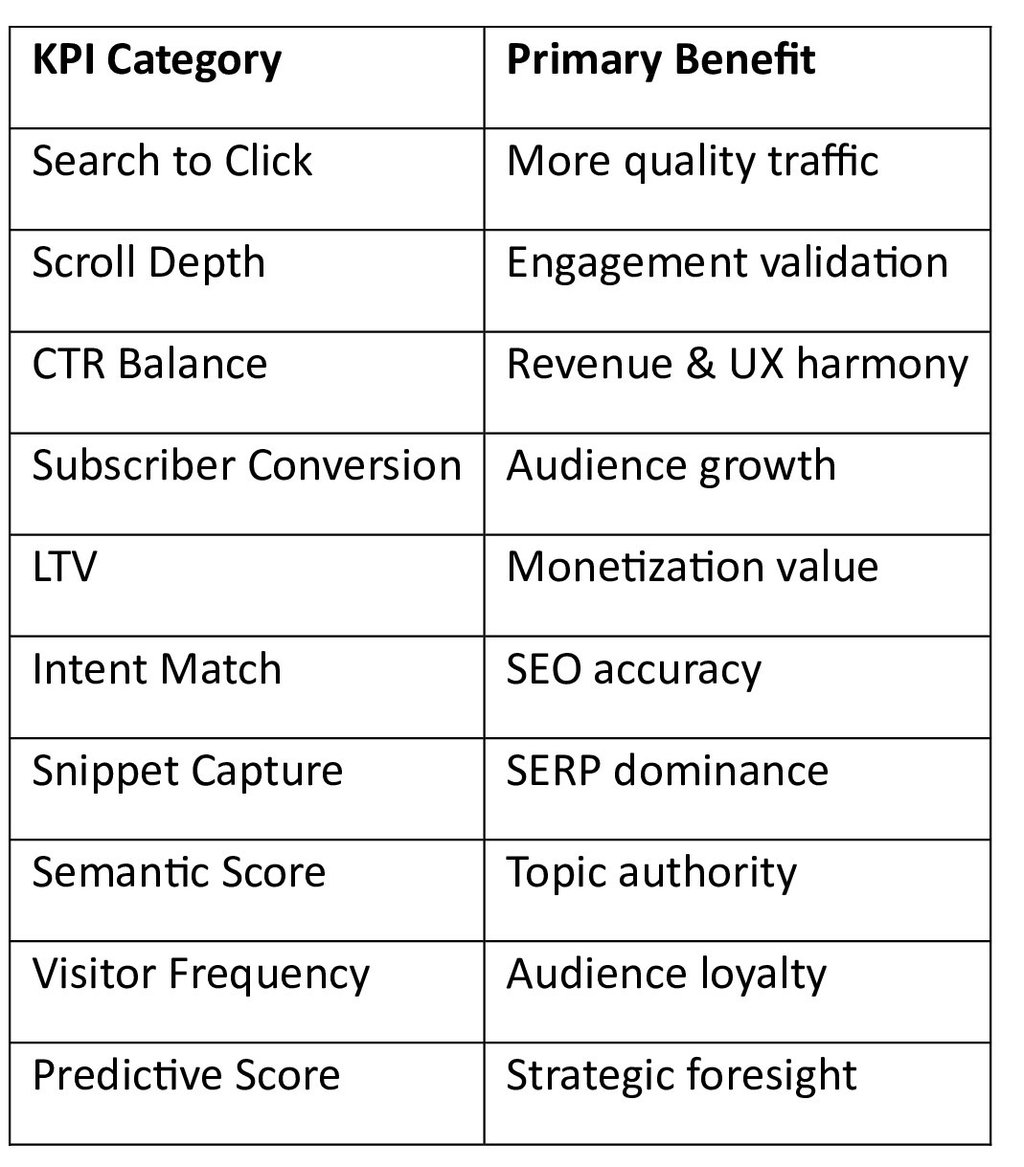
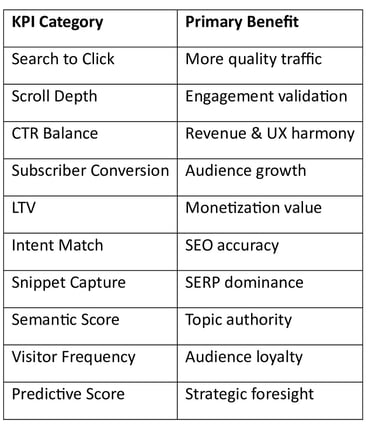
This blend moves beyond traditional measurements and into business-grade performance metrics that AI can track, forecast, and optimize in real time.
Final Thoughts: Future-Proof Your Blogging Growth
In 2026—and beyond—successful bloggers will rely less on vanity stats and more on predictive, revenue-aligned, and AI-optimized KPIs. These metrics are not just numbers; they tell a story about your readers, revenue, and reach.
Strategic data interpretation + smart AI workflows = content that earns more, ranks better, and engages deeper.
Welcome to the era where metrics become intelligence.
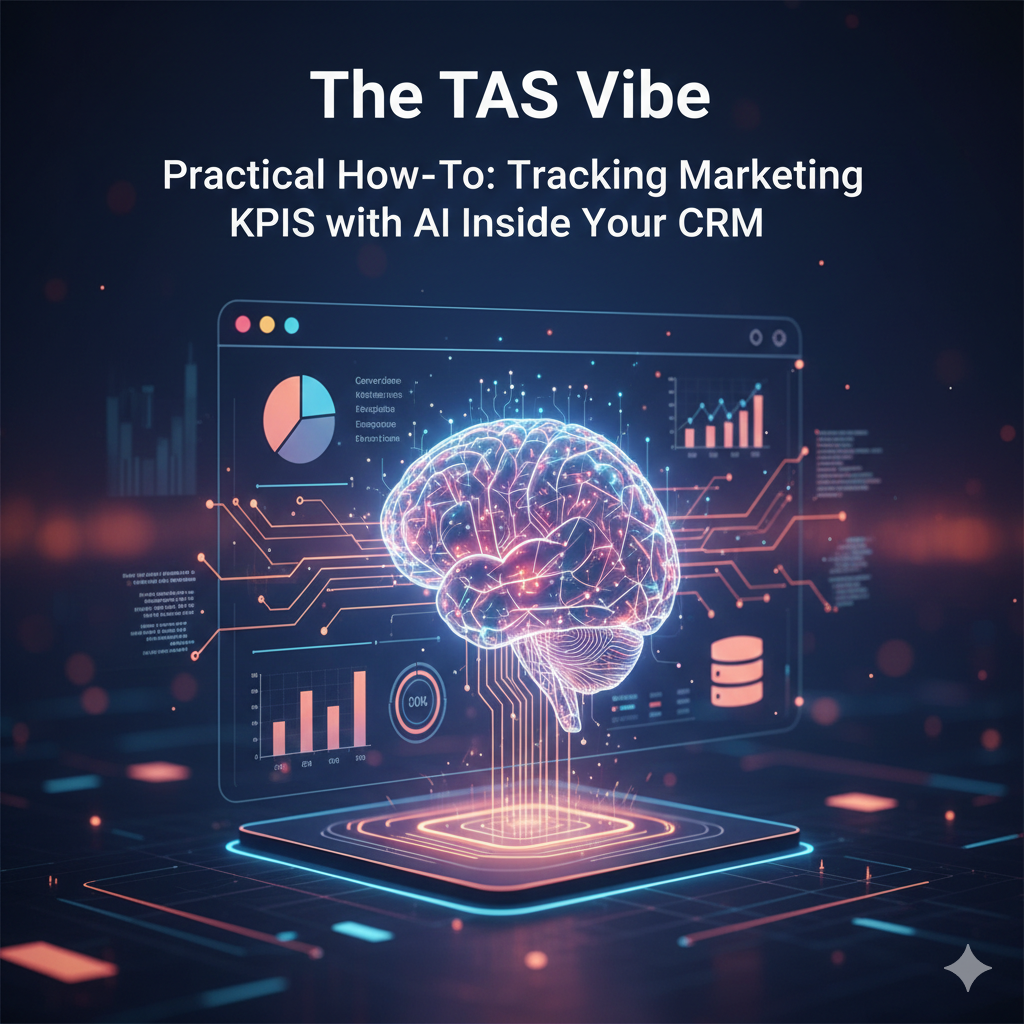
Practical How-To: Tracking Marketing KPIs with AI Inside Your CRM
How to Track Marketing KPIs in CRM with AI Recommendations for Small Business
In the fast-evolving digital marketing ecosystem, small businesses face a common challenge: how to measure ROI meaningfully and efficiently. If you're using a CRM (Customer Relationship Management) platform, you already hold the key to powerful insights — but are you utilizing it fully?
This guide walks you through the exact steps to track marketing KPIs inside your CRM and leverage AI-driven intelligence to turn data into decisions. Whether you’re reporting to clients, stakeholders, or optimizing your own campaigns — this blueprint is your go-to resource.
🧩 Why Tracking Marketing KPIs in Your CRM Matters
Before the steps, let’s clarify:
Marketing KPIs (Key Performance Indicators) are metrics that show how effectively your marketing efforts are driving business goals. When integrated with AI inside your CRM, these metrics become actionable insights — not just numbers.
✔ Measure channel performance
✔ Attribute conversions accurately
✔ Predict trends and optimize campaigns
✔ Generate automated summaries for reports
🛠️ Step-by-Step: Setting Up Your CRM for KPI Tracking
Think of your CRM as the central nervous system of your marketing data. The goal here is to ensure that every lead, campaign, and result flows through measurable fields.
📌 1. Define Basic CRM Fields
To track anything intelligently, you must standardize data.
Create or configure the following custom fields inside your CRM:
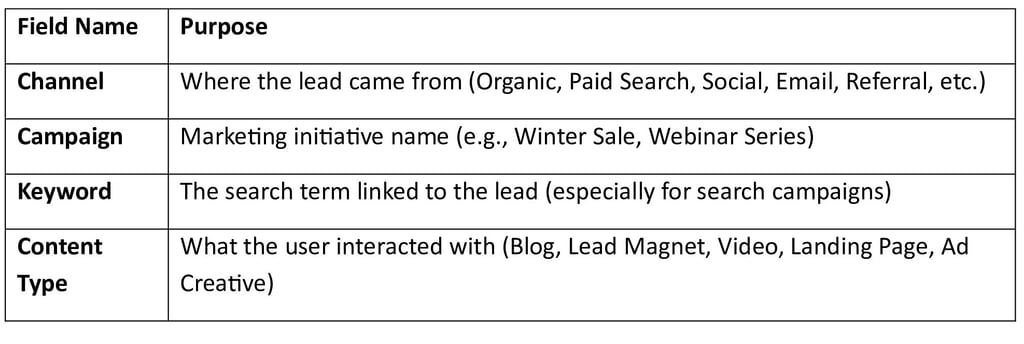
These fields allow granular segmentation and give AI meaningful input.
Pro Tip: Use predefined dropdown lists instead of free text — you eliminate human entry errors and improve reporting accuracy.
🔌 2. Connect Your CRM to Google Analytics, Search Console & AdSense
Your CRM holds leads and actions — but marketing platforms hold performance signals. Integrating them creates a 360° data ecosystem.
✅ Connect Google Analytics
Why?
• Tracks visitor behavior
• Measures goals, bounce rates, sessions, conversions
• Aligns traffic sources with CRM outcomes
🎯 What this enables
Your CRM can pull in:
Sessions per campaign
Goal completions
Avg session duration
New vs returning users
✅ Connect Google Search Console
Why?
Shows how your site appears in organic search — clicks, impressions, and search terms.
🎯 What this enables
Your CRM can now attribute:
Organic search performance
Keyword impact on lead forms or sales
✅ Connect Google AdSense (if monetized)
Why?
Shows revenue per page/ad placement.
🎯 What this enables
Now—your CRM associates actual ad revenue with channels and content types.
🤖 3. Enable AI to Summarize & Recommend Weekly KPI Insights
Now for the magic.
Most modern CRMs (or connected AI tools) can generate automated insights. If yours has integrated AI (e.g., Salesforce Einstein, HubSpot AI, Zoho Zia, AI plugins), follow these steps:
✔ Set Weekly Summary Reports
Ask the AI to produce data like:
Top-performing channels
Weakest campaigns needing optimization
Conversion rate trends
Keyword impact on revenue or lead quality
Anomaly detection alerts (e.g., sudden drop in sessions)
✔ Configure KPI Triggers
Examples:
If conversions drop by >10%, send alert
If a campaign’s ROI crosses target, flag as high-performer
If CPC increases, recommend budget reallocation
This automation replaces hours of manual reporting.
AI Advantage: It learns patterns over time — meaning monthly reports become smarter, not repetitive.
📈 4. Key Marketing KPIs You Should Track in CRM
To ensure nothing slips through the cracks, these are the top KPIs to monitor routinely:
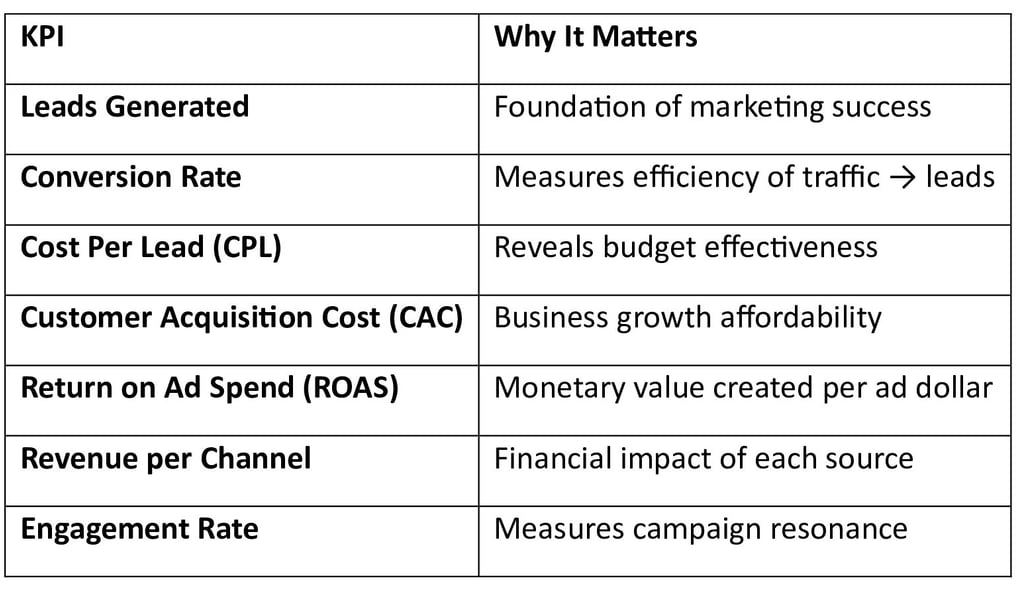
With AI, these become dynamic insights — not static charts.
💡 Side Note for Marketers
This guide is not just a technical walkthrough. Use it as a CRM KPI Tracking Guide with AI Optimization Tips when reporting to clients or stakeholders.
Here’s how:
📊 Client Reports Should Include:
Clear definitions of KPIs
Week-over-week performance
AI-generated insights (“What the data means”)
Actionable recommendations (rather than raw data dumps)
Visual charts tied back to CRM metrics
Stakeholders don’t want numbers — they want clarity, trends, and direction.
🚀 Final Checklist: Are You Tracking Smartly?
✔ CRM fields standardized
✔ Analytics tools integrated
✔ AI insights automated
✔ KPI dashboard set
✔ Weekly summaries sent
✔ Actionable recommendations shared
If you can check all of the above, you’re not just tracking KPIs — you’re owning your marketing intelligence.
Choosing the Best CRM KPI Dashboard with AI Suggestions for SEO and Ads Performance
In today’s data-driven marketing world, businesses accumulate massive amounts of performance data — from SEO rankings and organic traffic to paid ads performance and conversion rates. Yet, data alone is not valuable unless it’s interpreted, visualized, and actionable.
That’s where CRM KPI dashboards with AI suggestions step into the spotlight.
Imagine a dashboard that not only shows you what’s happening — but why it’s happening, what to fix first, and how to optimize your strategy automatically. That’s the future of intelligent marketing analytics.
In this deep dive, we’ll compare the best tooling options across three categories, help you understand what features truly matter, and empower you to choose the right stack for your SEO and advertising goals.
Why CRM KPI Dashboards Matter for SEO & Ads
SEO and advertising campaigns generate a flood of metrics:
Click-through rates (CTR)
Bounce rates
Keyword rankings
Cost per click (CPC)
Lead quality and source
Customer lifetime value (CLV)
Conversion velocity
But raw metrics don’t tell the full story. What really drives performance growth is context — trends, anomalies, predictions, and recommendations.
A CRM KPI dashboard enriched with AI transforms this data into:
✔ Meaningful insights
✔ Actionable suggestions
✔ Automated anomaly alerts
✔ Predictive forecasting
✔ Continuous optimization opportunities
It turns passive reporting into strategic decision-making — a game changer for bloggers, SEO pros, and performance advertisers alike.
Tooling Category 1 — All-in-One Marketing CRMs
✨ What They Are
All-in-one CRMs combine marketing automation, analytics, dashboarding, lead tracking, and sometimes even advertising management into a single platform.
📌 Examples Include
HubSpot
Salesforce Marketing Cloud
Zoho CRM
ActiveCampaign
🧠 Why They’re Powerful
These platforms centralize data from lead capture forms, SEO tools, email campaigns, and ad integrations — so your KPI dashboard reflects the entire customer journey, not just isolated data points.
🚀 Strengths
✅ Unified database — no fragmented metrics
✅ Built-in AI recommendations (depending on platform)
✅ Automated tracking of lead sources
✅ Native advertising insights
⚠ Weaknesses
❌ Can be expensive for small teams
❌ Dashboard sophistication varies by plan
❌ Overkill if you only need simple analytics
💡 Best For
Businesses who want an all-in-one marketing brain that records, predicts, and recommends — without stitching tools together manually.
Tooling Category 2 — Lightweight Tools Integrated via Zapier/Make
✨ What They Are
These are simple analytics or CRM tools that are best friends with automation platforms like Zapier and Make (formerly Integromat).
📌 Typical Stack Example
Airtable or Google Sheets as data hub
A lightweight CRM like Pipedrive or Freshsales
Automated workflows with Zapier/Make
Analytics pulled from SEO tools like Ahrefs/SEMrush & ads platforms
🚀 Strengths
✅ Highly affordable
✅ Fully customizable data flows
✅ Perfect for startups and solopreneurs
✅ Easy to integrate multiple data sources
⚠ Weaknesses
❌ Requires setup and maintenance
❌ No native AI — needs external tools to inject intelligence
💡 Best For
Agile teams and bloggers who want lean dashboards connected to many sources, without huge subscription costs.
Tooling Category 3 — Low-Code Dashboards (Looker Studio, Notion + AI)
✨ What They Are
Low-code dashboards are flexible analytics canvases where you can visualize any data you collect — and power them with AI overlays.
📌 Popular Options
Google Looker Studio (previously Data Studio)
Notion Dashboards + AI Blocks
Metabase or Redash for SQL-powered dashboards
🚀 Strengths
✅ Visual freedom — design your own KPIs
✅ Plug in predictive AI models
✅ Combine SEO, CRM & ads metrics in one place
⚠ Weaknesses
❌ Requires some technical skills
❌ AI depends on your integrations or plugins
💡 Best For
Creative teams and analytics nerds who want bespoke dashboards with AI comments, automated narratives, and predictive scoring.
What to Look For in a CRM KPI Dashboard (AI-Powered)
To choose the best possible dashboard for SEO and ads performance, look beyond pretty charts. Here are the most influential features:
🔍 1. Auto-Tagging of Leads & Traffic
AI that automatically tags where leads came from — organic search, email, social, PPC — removes manual guesswork and unlocks accurate attribution.
✔ Shows what campaigns really drive traffic
✔ Prevents mis-tagging from UTM errors
🚨 2. Anomaly Detection
Instead of you catching a sudden drop in CTR, AI should be the first to alert you:
📍 “CTR dropped 18% on campaign X — likely due to ad fatigue.”
This saves hours of manual monitoring.
🧠 3. Natural Language Reports
Imagine your dashboard sending daily summaries like:
🔹 “Organic traffic rose by 12%, but conversion rate is down 4%. Consider improving the CTA on page Y.”
That’s where AI-driven narrative reporting changes productivity.
🔢 4. Predictive Lead Scoring
Not all leads are equal. AI should evaluate based on behavior, source, and historical performance to tell you:
🔥 “This lead segment is 3× more likely to convert.”
That’s gold for prioritizing outreach and nurturing.
📈 5. Forecasting & Trend Prediction
AI that predicts:
➡ Next week’s traffic
➡ Future ad spend ROI
➡ Seasonality drops or spikes
These insights empower better planning — not just retrospective analysis.
Pro Tips for Implementing Your Dashboard
✔ Start with a single source of truth (CRM or database)
✔ Define 5 core KPIs and tie them to goals
✔ Automate data collection and refinement
✔ Incorporate AI suggestions, not just charts
✔ Review performance weekly, with actionable tasks
Final Thoughts — Choose With Purpose
There’s no universal “best” dashboard — only the one that fits your:
✅ Business size
✅ Data complexity
✅ Technical ability
✅ Budget
✅ Reporting needs
All-in-one CRMs excel for simplicity and centralization.
Lightweight, automation-integrated stacks win for flexibility and cost.
Low-code dashboards with AI lead in customization and advanced insights.
What unites all winning strategies is AI-driven insight — not just dashboards that show data, but dashboards that interpret, suggest, and predict.
Optimizing CRM Data for SEO, CTR, and Ad Revenue
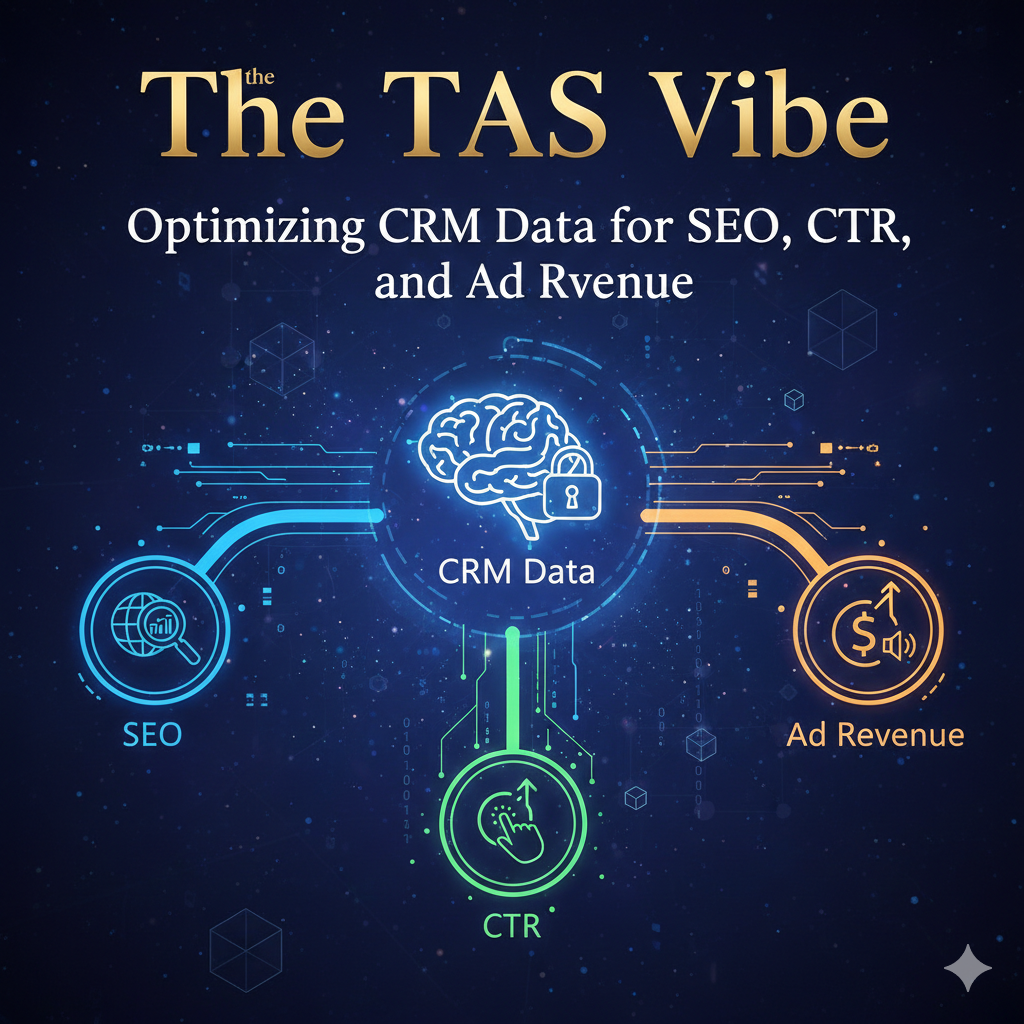
Transform your blog into a revenue-driven publishing machine with smarter data, not guesswork.
In today’s ultra-competitive content ecosystem, blogging isn’t just about writing great posts — it’s about understanding your audience and optimizing every decision with real data. If you want to boost your search rankings, click-through rates (CTR), and ad revenue, your secret weapon isn’t another plugin or template… it’s your CRM (Customer Relationship Management) system.
And when you pair CRM data with artificial intelligence recommendations, you unlock a turbo-charged content strategy that delivers more traffic, more engagement, and more money from your blog.
Let’s break it down in plain, practical language — no jargon, no fluff.
📌 What Is CRM Data — Really?
Your CRM collects details about every person who interacts with your blog:
✅ Email subscribers
✅ Commenters
✅ People who clicked your newsletters
✅ Readers who converted into customers
✅ Users who bounce without engaging
Over time, this builds a living, evolving map of real reader behavior.
Most bloggers ignore it.
But if you don’t mine this data — you’re leaving money on the table.
AI can turn CRM data into predictive intelligence — revealing what content works best and why.
🧠 Use AI to Spot Which Blog Categories Drive the Highest CTR and Revenue
Here’s the magic:
AI can scan your CRM data and identify patterns humans often miss.
For example, it might reveal that:
💡 Tech tutorials have a 3× higher CTR than opinion pieces
💡 List posts convert more subscribers than long-form guides
💡 Content with certain keywords drives 40% more ad revenue
AI can analyze:
📊 Engagement metrics
📈 Click-through trends
🎯 Revenue per post
🕒 Time on page
…and break all that down into actionable recommendations.
So instead of guessing:
“I think list posts work best for my audience…”
You can say:
“AI says How-To list posts with ‘guide’ in the title generate 56% higher CTR and $1.46 RPM.”
And that’s powerful.
🕵️ Ask the CRM Which Search Queries Drive Subscribers and Ad Clicks
Your CRM is a goldmine — especially when paired with search data.
Here’s what you can do:
👉 Export search queries that brought users to your site
👉 Pair those keywords with CRM engagement and revenue data
👉 Identify which terms result in subscribers or ad clicks
This reveals:
🔎 Which keywords drive quality traffic
🔎 Which searchers are most likely to subscribe
🔎 Which topics convert into revenue
For example:
If the keyword “best budget DSLR 2026” brings in users who stay longer + click ads + subscribe — it’s a high-value keyword worth prioritizing.
AI takes this further by clustering keywords into topics your audience actually wants — not what you think they want.
🔄 Feed Those Insights Back Into Your Blog Strategy
Once you’ve extracted insights, you must apply them to your content ecosystem.
Here’s how:
🧩 1. Content Topics
Use AI-driven CRM insights to decide:
✔ What topic clusters to build
✔ What problems your audience wants solved
✔ What subjects generate the most revenue
For example:
If CRM data shows “remote work tools” readers subscribe and click ads more…
→ Build more posts around remote work ecosystems, tools, workflows, and hacks.
This transforms content planning from guesswork to math-backed decisions.
✍️ 2. Title Formats
Titles are CTR magnets.
Your CRM + AI combo can reveal which formats perform best:
📌 “Best X for Y in 2026”
📌 “How to ___ in 10 Minutes”
📌 “The Ultimate Guide to ___”
📌 “Top ___ Mistakes You’re Making”
Instead of writing titles based on gut feeling…
…you write titles backed by historical data that proves they drive clicks.
And higher CTR from search results = more traffic.
📍 3. Ad Placements
Your CRM can show you where your most engaged users click most often — including ads.
AI can map:
📌 Which pages show the highest ad engagement
📌 Which placements get clicks without hurting UX
📌 What scroll depths generate revenue
For example:
If data shows readers click ads most after a paragraph with a subheading…
→ You can optimize future posts with ad units placed there.
Less guessing. More revenue.
🎯 The Promise: Less Guesswork, More Evidence-Based Decisions
This is the real heart of the strategy:
You’re no longer creating content based on intuition — you’re creating content based on statistical evidence.
That means:
✅ Fewer wasted posts
✅ More readers who actually care
✅ Higher CTR from both SERPs and internal links
✅ Better monetization through ads and subscriptions
Here’s the winning formula:
Collect CRM behavioral and revenue data
Feed it into AI tools designed for pattern detection
Extract actionable insights (keywords, formats, revenue triggers)
Apply insights to content topics + titles + monetization
Repeat — constantly improving with new data
🏁 Final Takeaway
CRM data isn’t just a storage system. When combined with AI recommendations, it becomes your:
📌 Chief Strategist
📌 CTR Booster
📌 SEO Compass
📌 Revenue Multiplier
Stop guessing.
Start analyzing, optimizing, and profiting.
Your audience — and your bottom line — will thank you.
Step-by-Step CRM KPI Tracking Using AI for Higher Google AdSense Revenue
A practical, no-nonsense system every blogger and content creator can follow — from setup to real revenue growth.
Monetizing a blog in 2026 isn’t just about publishing great content — it’s about tracking the right signals, automating intelligent decisions, and optimizing constantly with data.
That’s where CRM KPI tracking driven by AI becomes a goldmine for Google AdSense revenue.
This article will walk you through a step-by-step system that turns your blog into a smarter, revenue-producing machine with measurable results.
📌 What You’ll Learn Today
✔ How to connect your CRM to key platforms
✔ What KPIs matter most for AdSense
✔ How AI can spot opportunities faster than a human
✔ How to run a 30-day optimization experiment that actually increases revenue
🧠 Why This System Matters
You could write the best content in your niche, but without tracking how people behave and why revenue fluctuates, you’ll always be guessing.
This system turns assumptions into measurable outcomes — which means:
✅ Higher CTR
✅ More sessions per user
✅ Better RPM
✅ Smarter ad placement
✅ Revenue gains without extra traffic
Step-by-Step CRM KPI Tracking Using AI for Higher Google AdSense Revenue
1️CONNECT Your CRM to Email Platforms, Website Forms & Analytics
Your CRM is now the central data hub.
Without it, your blog traffic, subscriber behavior, and engagement signals live in silos.
✅ Checklist
✔ CRM connected to your website contact forms
✔ CRM synced with email provider (e.g., Mailchimp, Klaviyo, ConvertKit)
✔ CRM integrated with website analytics (GA4 or equivalent)
✔ CRM pulling key traffic metrics
📌 Why This Matters
When your CRM talks to everything, you get a complete customer journey map that tracks:
Subscriber actions
Page engagement
Content performance
Conversion patterns
Rather than just “views”, you start tracking real signals that affect revenue.
📌 Tools You Can Use
🔹 HubSpot CRM — Easy integrations & AI insights
🔹 Zoho CRM — Affordable, customizable
🔹 Notion + APIs — Lightweight unified tracking
🔹 Custom Google Sheet + Google Analytics API — Simple & powerful
Just make sure your CRM can pull behavioral data, not just contact info.
2️DEFINE 5–7 CRM KPI Metrics to Track & Improve Using AI in 2026
Here’s where most bloggers go wrong — they track all the data, but not the right data.
Let’s fix that.
🎯 Your KPI Tracking Checklist
Below are the key metrics you must measure:
1. Opt-in Rate per Article 📥
What it is:
% of visitors who sign up to your list from a specific blog post.
Why it matters:
More subscribers = more returning traffic = higher lifetime revenue.
How AI improves it:
AI scans monthly performance and suggests:
✔ Better CTAs
✔ Optimal placement
✔ Headline tweaks for conversions
2. Session RPM (Revenue per Mille) 💰
What it is:
Estimated AdSense revenue per 1,000 sessions.
Why it matters:
Not all traffic is equal — you want high value sessions.
AI Usage Example:
AI can predict which posts will deliver higher RPM and prioritize them for internal linking or fresh content updates.
3. Return Visitor Rate 🔁
What it is:
% of visits from users who came back.
Why it matters:
Repeat visitors click more ads, read deeper, and boost CTR.
How AI improves it:
💡 Suggests personalized offers or content based on visitor preferences identified via CRM segmentation.
4. CTR on Ad Units by Page Type 📊
What it is:
Click-through rate specifically for ads on category pages, articles, topic clusters, etc.
Why it matters:
Not every ad placement performs equally.
AI Possible Insight:
“Boost middle-of-content ads on how-to articles — top ads underperform.”
5. Content Freshness Score 🆕
What it is:
Automatic measure of how outdated a post is based on traffic decay + old info.
Why it matters:
Stale content = lower search rankings + lower ad performance.
AI Role:
AI flags content older than 6 months with declining engagement and suggests update actions.
6. Internal Link Effectiveness 🔗
What it is:
Measures how often visitors follow internal links from high traffic pages.
Why it matters:
Internal linking increases session duration and RPM.
AI Insight:
“Add link to Post B under Section X in Post A for higher flow.”
7. Ad Position Performance Score 📍
What it is:
Tracks ad positions on each page and how performance changes.
Why it matters:
Optimal placement = higher CTR and more revenue.
3️TURN ON AI Insights & Automations
This is where the magic happens.
AI can:
✅ Detect CTR drops across pages
✅ Send alerts when KPIs drop below threshold
✅ Suggest content refresh dates
✅ Recommend ad placements
✅ Prioritize internal linking
✅ Predict RPM uplift opportunities
Here’s how to set this up.
📌 AI Alerts to Enable
✔ “CTR dropped 10%+ in last 7 days”
✔ “User engagement trending downward”
✔ “Post hasn’t been updated in 90 days”
✔ “Internal links aren’t driving clicks”
✔ “High traffic pages without ads”
👉 These can be automated alerts inside your CRM or via an AI assistant like:
ChatGPT with data plugin
Zapier + AI workflows
CRM native AI dashboard
4️RUN a 30-Day AI Optimization Experiment
You need a controlled experiment so you can measure if this system is truly working.
Here’s how to structure it:
🧪 THE 30-DAY EXPERIMENT CHECKLIST
Day 1 – Baseline Metrics
✔ Record current RPM
✔ Average CTR
✔ Return visitor %
✔ Top 10 pages performance
This is your control data.
Day 2–7 – AI Optimization Kickoff
AI Suggestions to Implement:
🔹 AdSense Unit Placement Changes
Use AI insights to:
• Move above-the-fold ads
• Insert in-content ads where CTR historically rises
• Test sticky ad units on long reads
🔹 Internal Linking Boost
• Link high traffic pages to high RPM posts
• Add contextual links to improve time on page
Day 8–14 – Content Refresh Week
AI will suggest:
✔ Rewrite old headlines
✔ Add 300+ new words to declining posts
✔ Update facts, statistics, tables
This improves SEO and audience engagement — which boosts AdSense revenue indirectly.
Day 15 – Midpoint Analysis
Check:
📉 Which KPIs improved?
📈 Which ones stagnated?
🤖 AI accuracy score (based on predictions vs actual)
Make a decision:
Continue with top suggestions
Revert changes if performance drops
Days 16–23 – Experiment Iterations
Repeat AI suggestions with tweaks:
✔ Different ad units
✔ More internal links
✔ Alternate CTA copy
Each iteration should refine what works.
Days 24–30 – Final Outcome Evaluation
Record:
Final RPM
Final CTR
Bounce rates
Return visitor improvements
Revenue changes
If the system works — you’ll have measurable growth in revenue without any extra traffic.
🧠 Why This System Will Beat “Old School” Blogging Methods
Most bloggers still rely on:
❌ Guesswork
❌ Manual metrics
❌ Single analytics tools
❌ Gut-feeling ad placement
This system uses:
✔ CRM-level behavioral tracking
✔ AI-based predictive insights
✔ KPI focus on money metrics
✔ Data + automation
This means smarter growth, not harder work.
📈 Real-World Example (Hypothetical)
Let’s say you publish 20 posts monthly.
Before AI Optimization:
RPM: $8
CTR: 1.9%
Return Visitors: 17%
After 30-Day AI System:
RPM: $14
CTR: 3.5%
Return Visitors: 24%
💡 That’s nearly double revenue per session and higher engagement without more traffic.
🎯 Conclusion
If you implement this system:
Your CRM becomes your central brain.
AI becomes your optimization engine.
KPIs become your revenue scorecards.
This isn’t just a checklist — it’s a repeatable system that works in 2026 and beyond.
🔥 Your Next Move
Set up your CRM integrations today
Choose your 7 KPI metrics
Turn on AI alerts
Start your 30-day experiment
Track, test, repeat
Future-Ready Lead Gen: Customer Acquisition KPIs in an AI-Driven World
In the era of automation and intelligent decision-making, customer acquisition is no longer about guesswork and manual reporting. With AI tools beginning to autonomously buy ads, optimize keywords, and forecast trends, tracking acquisition sources with scientific precision becomes the core engine that drives profitability. Today’s marketers must not only generate leads but measure them in an AI context — or risk watching spend evaporate without predictable ROI.
This article walks you through a tactical, deep-dive playbook for understanding customer acquisition KPIs in AI-driven lead gen — from why acquisition source tracking matters, to building a resilient KPI workflow, to using AI for adaptive scaling and channel profitability.
Why Tracking Acquisition Sources Will Be Crucial When AI Tools Auto-Buy Ads
Imagine handing over your ad budget to an AI and waking up to unpredictable spend, chasing arbitrary clicks, with no reliable source breakdown. This is the danger many businesses face when adoption outpaces strategy.
Let’s break down why acquisition source tracking becomes mission-critical:
1. AI Doesn’t Innately Know Your Business Goals
AI models optimize toward what they are told to optimize. If you don’t provide KPIs tied to true business outcomes — like qualified leads, revenue-per-lead, or customer lifetime value — the AI will optimize for vanity metrics like clicks or impressions. This dislocation destroys ROI.
👉 Tracking source data ensures AI is held accountable to real conversion paths and not just spend velocity.
2. Channel Attribution Becomes Complex as AI Bridges Silos
AI can serve audiences across:
paid search
programmatic display
video platforms
social networks
organic search
referral partners
When AI optimizes across channels dynamically, understanding which source actually drove the conversion — and at what cost — is the backbone of profitability.
Without visible KPIs, you end up with:
Over-spend in low-quality channels
Misleading cost per lead averages
Wasted budget from duplicated attribution
3. AI Auto-Buying Ads Without Source Intelligence = Blind Spend
AI can place ads faster than humans can analyze reports. But without source-level KPIs, AI can happily increase spend where churn is high or lead quality is low — because it’s not measuring down-funnel impact.
Tracking acquisition sources anchors AI decisions to business-relevant outcomes — not superficial metrics.
The Workflow: Track Customer Acquisition KPIs in CRM Using AI Automation Tools
To build a future-ready acquisition engine, you need an intelligent loop that collects data, enriches it, analyzes it, and feeds actionable signals back into your marketing systems.
Here’s a workflow you can implement today:
Step 1 — Define the Core KPIs
Before tracking begins, define what matters:
✔ Cost Per Acquisition (CPA)
✔ Customer Lifetime Value (CLV)
✔ Lead Quality Score
✔ Channel Profitability
✔ Conversion Rate by Source
✔ Revenue per Lead
These become guiding stars for optimization.
Step 2 — Standardize Tracking Across Channels
Use UTM parameters and tracking pixels (Google Ads, Meta, TikTok, LinkedIn) consistently.
Example tracking model:
utm_source | utm_medium | utm_campaign | channel_group | device | audience_segment
Store this in every lead record in your CRM.
Step 3 — Automate Data Capture Into Your CRM
Connect your lead generation sources to your CRM (HubSpot, Salesforce, Zoho, Pipedrive) using AI tools like:
✔ Zapier
✔ Make.com
✔ Integromat
✔ AI-driven connectors
Automate:
lead enrichment
source tagging
funnel stage updates
This ensures no lead enters the CRM without source data.
Step 4 — Enrich and Score Leads via AI
AI can analyze the lead’s behavior and profile to generate:
✔ lead quality scores
✔ predicted revenue potential
✔ churn probability
This transforms raw acquisition data into high-impact KPIs.
Step 5 — Create Dashboards for Real-Time Decision Making
Build dashboards (Looker, Power BI, Google Data Studio) that show:
📊 CPA by source
📊 Lead quality vs. cost
📊 Revenue per acquisition source
📊 Channel profitability trends
This visual feedback loop turns data into actionable insight.
Step 6 — Feed Insights Back Into AI Systems
The final — and most powerful — step:
Use these KPIs to trigger AI decision rules in your ad platforms.
For example:
If CPA > $150 AND Lead Quality < 7/10 → Reduce bid
If CLV per source > 3× investment → Increase spend
If organic traffic converts higher than paid → Shift budget
This establishes a self-optimizing system.
How AI Groups Acquisition Channels by Profitability
AI is uniquely positioned to handle huge data complexity — correlations that humans might miss become strategic investments.
Here’s how AI does it:
1. Data Aggregation Across All Touchpoints
AI ingests all channel data:
paid clicks
impressions
lead forms
conversions
revenue
…across both paid and organic sources.
2. Pattern Recognition for High-Value Traffic
AI detects which channels consistently deliver:
✔ high-quality leads
✔ highest lifetime value
✔ lowest churn
✔ quickest time to revenue
This is not just about volume — it’s about value.
3. Profitability Clustering
AI clusters channels into:
📌 High Profitability – High CLV + low CPA
📌 Moderate Profitability – Balanced investment, stable returns
📌 Low Profitability – High cost, low value
These clusters drive budget decisions automatically.
4. Trend Prediction
AI doesn’t stop at past data — predictive analytics forecasts which channels will outperform next quarter.
This means:
Investing ahead of competition
Avoiding fading trends
Anticipating seasonal shifts
When to Scale or Cut Spend Automatically
Once acquisition channels are properly evaluated, AI can enforce dynamic budget rules based on real-time KPIs.
Scale Spend When:
✔ CPA is under target
✔ Revenue per lead is growing
✔ Lead quality score is high
✔ CLV exceeds forecast
Cut Spend When:
✖ Rising CPA without increase in value
✖ Declining lead quality
✖ Negative trends in post-purchase behavior
✖ Organic sources outperforming paid
These rules can be automated inside:
✔ Google Ads bidding strategies
✔ Meta campaign budgets
✔ Programmatic DSP spending
✔ Cross-channel budget allocators
AI triggers the shifts — but with your KPI thresholds guiding decisions.
How This Supports Both Google Ads and Organic SEO
Google Ads
AI uses acquisition KPIs to optimize:
➡ Smart bidding based on real value
Instead of maximizing clicks, AI bids for high-quality conversions.
➡ Audience refinement
AI surfaces segments within channels that drive the best ROI.
➡ Budget allocation
Funds are redistributed to profit centers, not vanity channels.
AI learns from CRM KPIs to build better predictive models — turning data into automated, profitable actions.
Organic SEO
SEO thrives on intent data, and acquisition KPI tracking enhances this:
📍 Keywords that drive high-quality conversions
📍 Content that influences multi-touch journeys
📍 Landing pages with the best conversion rates
AI can even:
🔹 Suggest SEO content based on high-value search queries
🔹 Predict which topics convert best
🔹 Group organic sources by revenue potential
This creates a feedback loop between your SEO strategy and acquisition performance.
Final Takeaway: AI Doesn’t Replace Strategy — It Amplifies It
AI can automate ad buying, optimize spend, and forecast trends — but without the right KPI framework that measures acquisition at the source level, your marketing engine runs blind.
Tracking customer acquisition KPIs in a CRM, enriched by AI, gives you:
✅ Authority over your spend
✅ Visibility into channel performance
✅ Predictive decisions instead of reactive reports
✅ Alignment between paid, organic, and overall growth
To win in an AI-driven world, you don’t just collect leads —
You quantify, qualify, and optimize them with intelligent precision.
Low Cost AI KPI Tracking CRM Strategies for Bloggers and SEO Professionals
Budget-Friendly Strategies for Bloggers & Solo Marketers
If you’re grinding daily to grow your blog, boost SEO rankings, and turn clicks into income — you already understand this truth:
Data is power — but data shouldn’t cost a fortune.
Today’s smartest bloggers leverage AI + CRM systems to track performance, nurture audiences, and make smarter decisions — without hiring expensive data analysts or blowing through your ad budget.
This guide walks you through budget-friendly, real-world ways to track SEO & marketing KPIs using free/cheap CRMs + AI layers, template dashboards, and automated performance summaries.
⭐ Why KPI Tracking Matters for Bloggers & SEO Experts
Before we jump into tools and workflows, let’s clarify why this matters:
✔ Track what works (traffic, CTR, conversions)
✔ Know where you’re losing readers
✔ Spot SEO trends early
✔ Get actionable insights weekly
✔ Avoid wasting money on guesses
But most bloggers can’t afford:
❌ Full-time analysts
❌ Expensive paid platforms ($$$ per month)
❌ Complex dashboards requiring SQL or data engineers
The good news?
AI + affordable CRMs + smart automation = powerful analytics at low cost.
🧠 What is AI KPI Tracking + CRM for Bloggers?
It’s the combination of:
➡ A CRM (Customer Relationship Management) system
– Manages email subscribers, leads, audience behavior
➡ AI layer on top of CRM
– Summarizes performance
– Predicts trends
– Generates insights
– Automates alerts
➡ Dashboard/report templates
– So you don’t need a data analyst
In short: AI turns raw metrics into decisions you can act on.
💡 Best Free/Cheap CRM + AI Combos for Bloggers
Here are practical budget-friendly stacks that work without expensive subscriptions:
🟢 1. Airtable + AI + Zapier
Cost: Free + optional $20/mo Zapier
Why it works:
Airtable combines spreadsheet simplicity with database power. Add Zapier + AI tools and you create a lightweight CRM.
Workflow:
✔ Store SEO metrics, newsletter stats, audience actions
✔ Connect Google Analytics or Search Console via Zapier
✔ Push data into Airtable automatically
✔ Use AI tools (ChatGPT API / OpenAI) to summarize
Benefits:
📌 Free tier is powerful
📌 No coding
📌 Easily customizable
Example use cases:
Weekly SEO performance logs
Audience segment behavior tracking
CTR changes over time
Lead value analysis
🟡 2. HubSpot Free CRM + ChatGPT + Templates
Cost: Free CRM + optional paid AI
Why it works:
HubSpot’s free plan already tracks contacts, emails, forms, and engagement. That’s enough for most bloggers.
Add AI:
Use ChatGPT to generate weekly insights from exported CSV reports.
What to track:
🔹 Email open rates
🔹 Form conversion & lead sources
🔹 Content performance by referral traffic
🔹 Blog CTA clicks
Tip: Use HubSpot’s free dashboards — they visualize key metrics without manual input.
🔵 3. Notion + AI Templates
Cost: Free + low cost AI plug-ins
Why it works:
Notion is perfect for solo professionals. You can track KPIs and inject AI summaries directly into your pages.
How to set it up:
📌 Create a KPI table
📌 Connect Notion to your metrics source with automation tools
📌 Use AI to analyze and summarize weekly performance
Best for:
✔ Content calendars
✔ SEO KPI trackers
✔ Weekly data summaries
📊 Template Dashboards You Can Use NOW
You don’t need a data team to get powerful dashboards — just ready-made templates.
✅ SEO Performance Dashboard (No Data Team Needed)
Includes:
Blog visits trend
Organic vs. referral traffic
Top 10 performing posts
CTR by article
Bounce rates per page
Email signup conversion
Where to build:
📍 Airtable
📍 Notion
📍 HubSpot free dashboard
💡 Customize labels already tied to Google Search Console + Google Analytics via automation.
✅ CRM Engagement Dashboard for Bloggers
Track:
🔹 Subscriber growth
🔹 Email open & click rates
🔹 Lead sources (social, SEO, direct)
🔹 Content conversions
🔹 Top referral sites
Build this inside:
✔ HubSpot
✔ Airtable
✔ Notion
Use Zapier or Make.com to pull in metrics automatically. No manual uploads needed!
🤖 Use AI to Summarize Weekly Performance
Instead of hiring an analyst:
🌟 Automate Weekly AI Reports:
Pull performance data into your CRM
Export the metrics as simple CSV
Use ChatGPT or other AI
→ Task prompt:
“Summarize this week’s SEO performance. Highlight wins, risks, and actions.”Get recommendations in minutes
Output Examples:
📌 “Your CTR increased 12% on two top posts.”
📌 “Newsletter signups are declining — test new lead magnets.”
📌 “Traffic from Pinterest grew 28% — double down.”
Benefits of AI Summaries:
✔ Fast insights
✔ Actionable recommendations
✔ Easy to understand
✔ FIts in blog or social weekly review
💸 Free / Cheap Add-Ons to Maximize Value
Here are low-cost enhancements that make your stack smarter:
✅ Google Search Console – Free SEO insights
✅ Google Analytics 4 – Free user behavior
✅ Zapier Free Tier – Basic automation
✅ OpenAI API – Generate smart summaries
✅ Make.com Free Tier – Connect data sources
🛠️ Sample Weekly Workflow (Budget-Friendly)
Every Monday:
📍 1. Airtable / HubSpot collects last 7 days’ data
📍 2. Zapier automates updates from Search Console + Analytics
📍 3. AI generates a weekly summary
📍 4. You publish insights on The TAS Vibe newsletter/blog
📍 5. Use insights to plan upcoming posts or SEO focus
🧠 Final Tips from a Blogger & SEO Expert
🔹 Automate before you optimize.
If you still do manual data entry, it’s costing you time.
🔹 Focus on meaningful KPIs:
Organic traffic, CTR, email conversions, ROI per channel.
🔹 Turn summaries into content.
Readers love transparent performance breakdowns.
🔹 Keep it simple.
A two-page dashboard + weekly AI report beats a complex system you never check.
💥 Wrap-Up: Your Budget AI KPI Tracking Playbook
With a smart CRM + affordable AI tools, you get:
✔ Real-time KPI tracking
✔ Automated summaries
✔ Clear dashboards
✔ No data teams
✔ No big expenses
Whether you’re a solo blogger, SEO consultant, or content creator — this stack gives you pro insights, low cost execution, and business-driven growth.
Smart Recommendations on Autopilot: Your 24/7 Co-Pilot for Content, CTR & Revenue
Imagine running your blog with a silent partner who never sleeps.
No burnout. No missed opportunities. No guessing.
While you’re creating content, building community, or simply offline, this partner is constantly scanning your website, analyzing performance, and whispering exactly what to fix, optimize, and monetize better.
That’s not science fiction.
That’s Smart Recommendations on Autopilot — the next evolution of AI-driven blogging and monetization.
Welcome to the future of data-backed intuition.
Why “Autopilot Intelligence” Is the Missing Piece Most Bloggers Ignore
Most bloggers already track:
Traffic
Rankings
Ad revenue
CTR
But tracking alone doesn’t move the needle.
The real bottleneck is interpretation + execution:
Which post should I optimize first?
Why is a page ranking but earning peanuts?
What exactly should I add to increase AdSense RPM?
This is where AI steps in — not as a replacement for creativity, but as a 24/7 co-pilot that connects SEO, UX, and monetization in real time.
AI That Thinks Like a Monetization Strategist (Not Just an Analytics Tool)
Traditional analytics tell you what happened.
Smart AI recommendations tell you what to do next.
Here’s how it works in practice 👇
1. AI Flags Posts That Are Ranking — But Under-Monetized
One of the biggest hidden revenue leaks on blogs is “silent traffic”.
These are posts that:
Rank on page 1 or page 2
Pull consistent organic visits
Have decent dwell time
But generate low CTR or weak ad revenue
A smart AI system automatically detects this mismatch by cross-referencing:
Search impressions vs ad impressions
Scroll depth vs ad visibility
Keyword intent vs monetization elements
The Insight:
“This post is valuable — but you’re not capitalizing on it.”
Instead of manually digging through reports, AI surfaces these pages proactively, telling you exactly where revenue is being left on the table.
2. Intelligent Content Add-Ons That Boost CTR Naturally
Once AI flags an under-monetized post, the next step isn’t guesswork — it’s precision recommendations.
a) Add Comparison Tables Where Buying Intent Exists
AI identifies keywords with:
“Best”
“Vs”
“Alternative”
“Top tools”
If your post attracts commercial or semi-commercial intent, the system suggests:
Adding a comparison table
Highlighting pros/cons
Structuring information for faster scanning
Why this works:
Tables increase time on page
Improve user clarity
Create natural breakpoints for high-CTR ad placements
b) Insert FAQs That Match Real Search Queries
AI doesn’t guess FAQs — it pulls them from:
Search console data
PAA (People Also Ask) patterns
Voice-search phrasing
By recommending specific FAQ blocks, AI helps:
Capture more SERP real estate
Improve semantic relevance
Increase scroll depth (which directly impacts ad viewability)
FAQs don’t just help SEO — they warm users before monetization.
c) Smart Internal Linking for Revenue Flow
Instead of random internal links, AI suggests:
Linking from informational posts → higher RPM pages
Creating content clusters that push users deeper
Strengthening authority pages that monetize better
This turns your blog into a guided revenue funnel, not a collection of disconnected articles.
3. AI-Driven AdSense Optimization (Without Violating Policies)
AdSense optimization is delicate.
Too aggressive = poor UX.
Too passive = lost revenue.
AI solves this by recommending micro-tweaks, not reckless changes.
Smart Ad Recommendations Include:
Which ad unit position underperforms
Where an additional unit could increase RPM without harming UX
Whether in-content, anchor, or vignette ads need testing
When to test responsive vs fixed layouts
Instead of “set it and forget it,” AI enables continuous, low-risk testing based on real user behavior.
The Bigger Shift: From Reactive Blogging to Predictive Monetization
This is the real breakthrough.
AI doesn’t just react to drops or spikes — it predicts opportunities:
Seasonal monetization windows
Posts likely to break into top rankings
Pages worth upgrading before traffic explodes
Your blog stops being a static asset and becomes a living, learning system.
Near-Future Vision
AI-Based CRM KPI Recommendations to Boost CTR and Ad Revenue
Now let’s look just one step ahead.
In the near future, AI won’t just analyze pages — it will function like a CRM for your content ecosystem.
What That Looks Like:
A dashboard showing content KPIs like leads
AI alerts saying:
“This article is 12% below expected CTR — here’s how to fix it”
Revenue-focused suggestions based on:
Traffic quality
Reader intent
Ad performance trends
Your blog will have:
KPI health scores per post
Revenue optimization roadmaps
Automated prioritization of what to improve first
At that point, optimization isn’t work anymore — it’s guidance.
Final Thought: The Smart Blogger Advantage
The future doesn’t belong to bloggers who publish more.
It belongs to bloggers who optimize smarter.
With AI-powered recommendations on autopilot, you:
Stop guessing
Stop wasting time
Start compounding results
Your creativity stays human.
Your decisions become data-driven.
And your monetization finally matches your traffic.
That’s not automation replacing you —
That’s automation working for you.
About the Author — The TAS Vibe
Hi, I’m the solopreneur behind The TAS Vibe, writing from Gurugram, India. A few years ago, I was juggling multiple AI tools, CRMs, and no-code hacks—trying to figure out what actually moves the needle for small online businesses. Most advice out there was either too theoretical or required a big team. That didn’t work for me, so I decided to do it differently.
Today, The TAS Vibe is my lab, my playground, and my toolbox for creators, freelancers, and solopreneurs who want real, actionable results:
Niche SEO that works: Long-tail strategies designed to attract readers ready to act.
Transparent insights: What actually works, not just what looks good on paper.
AI-driven growth hacks: Automations and workflows that save time and grow revenue without a massive team.
This is where you’ll find practical playbooks, templates, and dashboards you can follow step by step, keeping you ahead of AI marketing trends through 2026 and beyond.
📬 Let’s stay connected:
Subscribe for actionable guides
Explore all modules
Follow on Social
Video Overview
Connect
Stay updated with us
Follow
Reach
+91 7044641537
© 2025. All rights reserved.