Best AI Automation Workflows for Digital Marketing Success
Discover the best AI automation workflows for digital marketing success, helping solopreneurs boost leads, save time, scale faster, and grow smarter in 2026
TECHNOLOGYAI MARKETING AUTOMATION FOR SOLOPRENEURS
The TAS Vibe
1/13/202619 min read
My post content
AI Automation Workflows That Actually Move the Needle (No Hype, Just Results)
Audio Overview
👤 Author Bio: Agni — Automation Architect for the Solopreneur Era
Agni is an automation architect, AI workflow strategist, and digital systems designer who helps solopreneurs build scalable businesses without building large teams. With a sharp focus on AI marketing automation, workflow architecture, and revenue-driven systems, Karan doesn’t just review tools — he engineers how those tools work together to create measurable growth.
Unlike traditional marketers who chase trends, Karan operates at the systems level. His work centers on one core belief:
Tools don’t create leverage. Well-designed workflows do.
Over the last decade, Agni has helped bloggers, creators, coaches, and online founders reclaim 20–40+ hours per month by replacing manual effort with intelligent automation. From AI-powered content engines and lead qualification flows to email revenue systems and zero-touch onboarding pipelines, his strategies are built for execution, not theory.
🔗 Connection to Module 2: The Ultimate AI Tool Stack for Solopreneurs
This article is deeply connected to Module 2, where Agni breaks down the AI tool stack that actually matters in 2026. But instead of listing tools in isolation, he shows:
Where each tool fits inside a real workflow
When automation should replace human effort
Why some popular tools reduce ROI instead of increasing it
Module 2 positions Agni not as a tool promoter, but as a workflow strategist — someone who understands the invisible systems that turn AI tools into profit-generating machines.
✍️ Writing Philosophy on The TAS Vibe
Agni’s writing is intentionally human, practical, and execution-focused. No fluff. No recycled AI jargon. Each article is designed to:
Educate without overwhelming
Inspire without exaggeration
Convert readers into action-takers, not passive consumers
If you’re a solopreneur looking to automate smarter — not harder — you’re in the right place.
Follow Agni on The TAS Vibe to master AI automation workflows that don’t just sound impressive — they actually work.
Introduction: From AI Tools to AI Results — Where Real Automation Begins
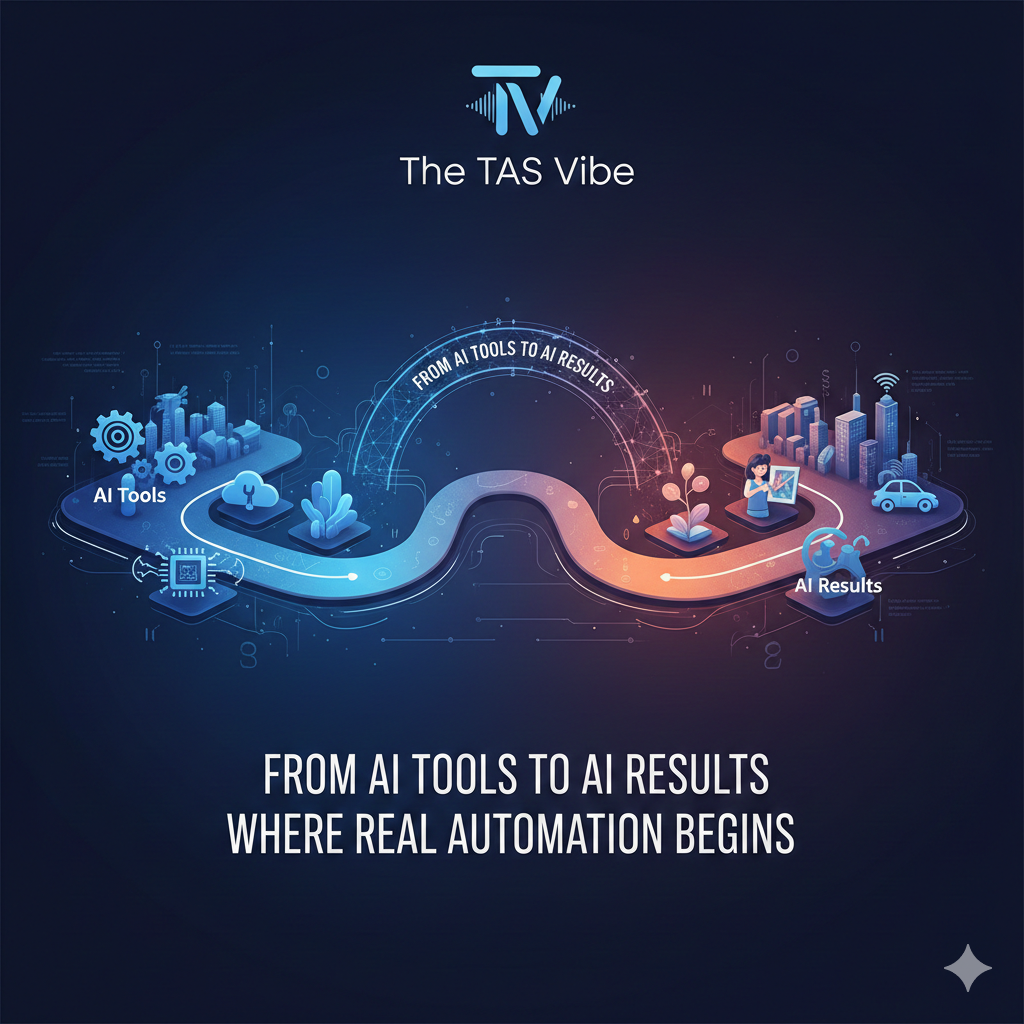
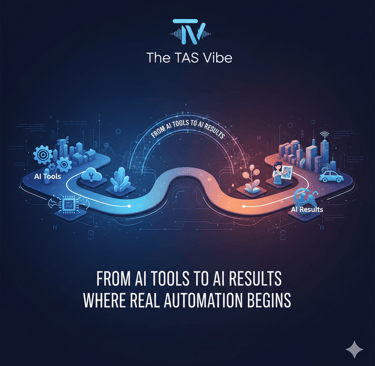
If Module 2 was about what AI tools every solopreneur must have in 2026, Module 3 is about how those tools actually work together to produce results. And this is where most creators, bloggers, and digital entrepreneurs quietly fail.
Here’s the uncomfortable truth:
Tools alone change nothing.
You can subscribe to the best AI writing tool, the smartest CRM, the fastest automation platform—and still see zero growth. Why? Because tools without structure are just expensive software. Growth doesn’t come from collecting tools. Growth comes from orchestrating them into workflows that run your business while you sleep.
This module is the bridge—the missing link—between owning AI tools and turning them into a revenue-generating system.
Why Tools Without Workflows Don’t Move the Needle
Most solopreneurs fall into the same trap:
They buy tools hoping for instant results
They use each tool in isolation
They manually jump between apps
They still trade time for money
This creates AI fatigue, not automation.
Think of it this way:
Owning a piano doesn’t make you a musician.
Owning AI tools doesn’t make you automated.
What you need is coordination, sequencing, and logic—and that’s exactly where AI automation workflows come in.
Introducing Orchestration: The Real Power of AI Automation
Orchestration is the art of making multiple AI tools behave like one intelligent system.
Instead of:
Writing content manually
Posting manually
Tracking leads manually
Following up manually
You design workflows where:
One action triggers the next
AI decisions replace human delays
Data flows automatically between tools
Your business operates even when you’re offline
This is where solopreneurs win against teams.
Big companies move slow because they rely on people.
Solopreneurs move fast because they rely on automated workflows.
What to Expect in Module 3
This module is not theory. It’s not hype. And it’s definitely not “someday” knowledge.
You’ll implement 4 proven AI automation workflows that:
Save hours every week
Increase consistency across content and marketing
Improve CTR, engagement, and monetization
Are simple enough to build this week, even without tech skills
Each workflow is designed specifically for:
Bloggers
Coaches
Content creators
Digital solopreneurs
Google AdSense-focused websites
No fluff. No complexity. Just systems that work.
Why This Module Matters More Than Any Tool List
In 2026, everyone will have access to AI tools.
The real competitive advantage will be:
Who connects them better
Who automates faster
Who removes themselves from repetitive tasks
Module 3 is where The TAS Vibe philosophy becomes real—working smarter, scaling solo, and letting AI handle execution while you focus on strategy and creativity.
If you’re ready to stop experimenting and start operating like a system-driven solopreneur, this is where everything changes.
AI Automation Workflows That Actually Move the Needle (2026 Edition)
Most solopreneurs don’t fail because they lack tools.
They fail because they stack tools without building systems.
In 2026, the real winners are not those using “more AI,” but those who have automation workflows that compound results every single day—without hiring a team.
This guide breaks down four proven AI automation workflows that are already generating measurable ROI, not hype. But before jumping into tools, we must build the right foundation.
Section 1: Workflow Foundation ✓


(Where automation either succeeds—or silently fails)
The 3-Layer Workflow Architecture (Non-Negotiable)
Every high-performing AI workflow follows a simple but powerful structure:
Layer 1: Trigger (The “When”)
This is the event that starts the automation.
Examples:
A blog post is published
A user clicks an email
A visitor spends 60 seconds on a page
A lead books a call
No trigger = no automation.
Layer 2: Processing (The “Thinking”)
This is where AI adds intelligence.
Examples:
Content rewriting & repurposing
Lead qualification
Behavior analysis
Budget optimization
This layer decides what should happen next.
Layer 3: Action (The “Doing”)
The final outcome.
Examples:
Publishing content
Sending personalized emails
Booking calendar slots
Adjusting ad bids
Automation only creates value when it takes action.
Key Principles for Workflow Success
Automate outcomes, not tasks
(Saving time without increasing revenue is not automation—it’s convenience.)One workflow = one core KPI
Content → Reach
Email → CTR
Ads → ROAS
Chatbot → LeadsHuman stays in control
AI executes. You approve, optimize, and scale.
The ROI Framework: How Automation Pays You Back
Every workflow must deliver ROI in three dimensions:
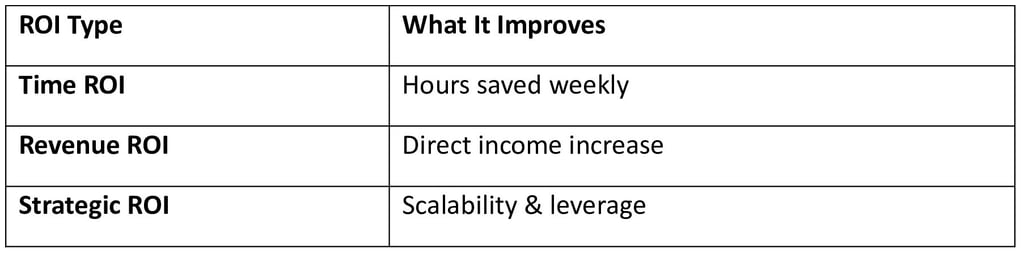
If a workflow fails even one—fix it or kill it.
The Critical Mindset Shift: Tools → Systems
Tools are ingredients.
Systems are recipes.
When solopreneurs stop asking “Which AI tool is best?” and start asking
👉 “Which workflow creates predictable growth?”
everything changes.
Now let’s build the systems.
Workflow #1: The Content Production Engine ✓
The Problem
1 blog post = 1 piece of content
Time required: ~6 hours
Growth potential: painfully slow
The AI-Powered Solution
1 blog post = 10 content assets automatically
Time required: 6 hours + 15 minutes monitoring
Same effort.
10× distribution.
3-Layer Breakdown (Real Execution)
Trigger:
✔ Blog post published in WordPress
Processing:
ChatGPT rewrites the article into:
LinkedIn posts
Twitter threads
Email newsletter
Short video scripts
Canva AI designs visuals
Descript converts text to video/audio
Action:
Make/Zapier auto-publishes content
Schedules posts across platforms
Tools Used
ChatGPT – Content intelligence
Make / Zapier – Workflow automation
Canva AI – Visual creation
Descript – Video & audio repurposing
Step-by-Step (Week 1 Setup)
Day 1–2:
Create content templates in ChatGPT
Day 3–4:
Connect WordPress → Make/Zapier
Day 5:
Design reusable Canva templates
Day 6:
Integrate Descript for short videos
Day 7:
Test, refine, go live 🚀
Expected Results
700% content output increase
5.5 hours saved per week
Higher topical authority = SEO lift
Real-World Example
A SaaS company:
From 4 posts/month → 40 assets/month
Organic traffic ↑ 212% in 90 days
Content team reduced from 3 → 1 person
Workflow #2: Behavioral Email Funnels ✓
The Problem
Standard email blasts:
CTR: 2–3%
Zero personalization
Low trust
The AI-Driven Solution
Behavior-based email triggers
CTR: 6–10%
Improvement: 497%
3-Layer Breakdown
Trigger:
✔ User clicks, views pricing, abandons cart
Processing:
AI analyzes intent
Segments user behavior
Action:
Sends hyper-relevant email
Adjusts follow-ups automatically
Tools Used
Brevo / Moosend / HubSpot – Email intelligence
Zapier – Behavior tracking
Week 1 Setup Plan
Day 1: Map customer journey
Day 2–3: Create trigger-based sequences
Day 4: Connect CRM + website
Day 5: Test segmentation
Day 6–7: Optimize copy
Expected Results
104% increase in first purchase
Lower unsubscribe rate
Higher lifetime value
Real-World Example
A coaching business:
Email CTR jumped from 2.1% → 8.7%
First-purchase rate doubled
Same list, 2× revenue
Workflow #3: AI Chatbot Lead Machine ✓
The Problem
Typical website conversion:
0.5%
Visitors leave unanswered
The AI Solution
Conversational chatbots
Engagement: 15%+
Conversion improvement: 300%
3-Layer Breakdown
Trigger:
✔ Visitor spends 45+ seconds
Processing:
Qualification questions
Budget & intent scoring
Action:
Book Calendly calls
Push hot leads to CRM
Tools Used
Botpress / ManyChat / Landbot
Calendly
Week 1 Setup
Day 1: Define ICP questions
Day 2–3: Build chatbot logic
Day 4: Connect CRM
Day 5: Integrate Calendly
Day 6–7: A/B test flows
Expected Results
200–300% more leads
Higher quality prospects
Sales team works less, closes more
Real-World Example
B2B SaaS:
Lead conversion ↑ 5×
Revenue increased 7× in 6 months
Workflow #4: Google Ads Automation ✓
The Problem
Manual bidding:
Wasted ad spend
Slow optimization
The AI-Optimized Solution
Smart bidding & automation
ROI improvement: 30%
3-Layer Breakdown
Trigger:
✔ Campaign performance data
Processing:
AI analyzes conversion signals
Adjusts bids in real time
Action:
Budget reallocation
Pause low performers automatically
Tools Used
Google Ads Smart Campaigns
Optmyzr
Zapier
Week 1 Setup
Day 1: Audit campaigns
Day 2–3: Enable smart bidding
Day 4: Connect Optmyzr
Day 5: Set automation rules
Day 6–7: Monitor & refine
Expected Results
30% lower CPA
20–30% better ROAS
Real-World Example
E-commerce store:
Monthly revenue ↑ $25,000
Same ad budget
Fully automated optimization
Final Takeaway for The TAS Vibe Readers
AI automation in 2026 is not about replacing humans.
It’s about replacing repetition.
When you build systems instead of stacks, your business:
Grows while you sleep
Scales without hiring
Compounds results daily
And that’s how solopreneurs win the AI era.
🧠 Section 2: Coordinating Multiple Workflows
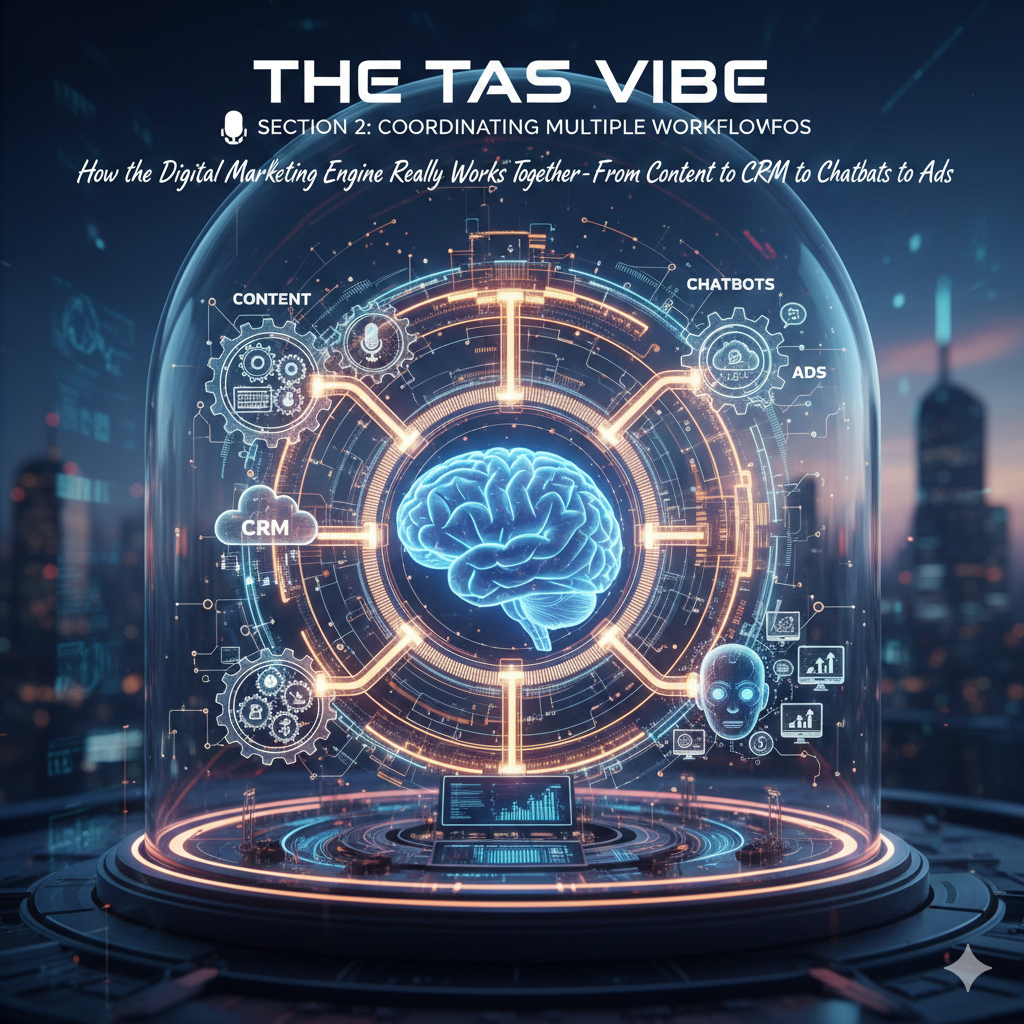

How the Digital Marketing Engine Really Works Together — From Content to CRM to Chatbots to Ads
Think of your digital ecosystem like a smart city: each component has its own role, but traffic only flows smoothly when those components coordinate. On your blog, you’re not just describing tools — you’re teaching how to architect living workflows that respond to user behavior, sync data, and unlock ROI. Let’s break it down.
🚦 1. Why Workflow Coordination Is the Heart of Modern Marketing
Today’s marketing isn’t linear — it’s a web of interactions.
A customer might:
Consume a blog post,
Join an email list,
Chat with a bot,
Watch a video,
See a retargeted ad.
These touchpoints must talk to each other, or you end up with siloed data, wasted ad spend, and lost leads. Integrating workflows with a CRM at the center enables real-time data flow, behavior-based triggers, and personalized journeys that scale.
📍 2. CRM — The Central Nervous System of the Ecosystem
Your CRM (Customer Relationship Management) isn’t just a contact list — it’s the brain of your entire workflow ecosystem.
🧠 What CRM Does
Stores user behaviors (clicks, opens, conversation history).
Houses lifecycle stages.
Serves as a single source of truth for other systems.
💡 Integration Magic
When CRM syncs bi-directionally with other tools:
✔ Email automation pulls real engagement data.
✔ Chatbots personalize interactions.
✔ Ad platforms target audiences based on real actions, not guesswork.
This eliminates duplicates, syncs contact updates, and aligns teams across marketing and sales.
👉 Pro Tip: A clean CRM dataset is the foundation for accurate targeting and high ROI.
📄 3. Workflow Pathway: Content → Email → CRM → Chatbot → Ads
Let’s map the way these pieces actually flow in a high-converting ecosystem.
🪄 Step 1: Content as the First Touch
Content isn’t just information — it’s your lead capture engine.
When someone:
Reads a blog,
Downloads a PDF,
Watches a video,
…their behavior should trigger next steps automatically.
Example:
A visitor reads a “Beginner SEO Guide” → Automatically added to CRM → Tagged as “SEO Interest.”
✉️ Step 2: Intelligent Email Workflows
Once in the CRM, behavior triggers email automation:
Opens content → sends a follow-up.
Clicks a link → moves to the next drip.
No opens → triggers a re-engagement series.
📌 Because the email system is synced with CRM data, messages are personalized, timely, and contextually relevant — a massive boost to CTR and conversion.
🤖 Step 3: Chatbots Close the Loop
Chatbots aren’t just conversational toys — when integrated with CRM they:
✔ Grab leads automatically
✔ Fetch CRM data for personalization
✔ Push new interactions back into CRM
✔ Trigger targeted responses based on behavior
✔ Hand off qualified leads to sales without friction
Example Workflow:
Visitor on pricing → chatbot asks qualifying questions → updates CRM with intent score → automated email campaign starts.
This keeps every conversation connected and actionable.
📢 Step 4: Ads That Actually Work
Once CRM knows a visitor’s stage and interests, you can:
✔ Retarget via Meta/Google Ads
✔ Exclude converted users
✔ Bid higher on high-intent prospects
✔ Use email engagement data to refine audiences
This ensures your ad spend is smart, not just loud.
🌐 4. The Role of API Orchestration & Ecosystem Thinking
To truly scale, you need coordination across systems — not silos.
📊 What Is Orchestration?
API orchestration coordinates data and workflows between systems so they operate like a single system, rather than separate tools.
Instead of manually syncing or building one-off automations, orchestration puts logic control at the center:
Data flows cleanly
Errors are reduced
Processes are monitored centrally
This is what separates reactive marketing from predictive marketing.
💡 5. Architecture Mindset: A True Ecosystem
To make complex workflows predictable and reliable, designers must:
🟡 Use Unified Data
Your CRM or CDP (Customer Data Platform) should house unified, cleaned, and real-time data that all pull from and push to every workflow.
🔵 Build Event-Based Triggers
Instead of scheduled blasts, use event triggers: email opens, page visits, chatbot clicks, purchase intent, etc.
🟢 Define Lifecycle Stages
Tag each user by:
Awareness
Consideration
Conversion
Advocacy
…and trigger communication based on where they are in their journey.
🔴 Map Dependencies
Automatically move users forward — don’t wait for manual intervention.
This is the difference between a stack of tools and an ecosystem of experiences.
📈 6. Result: Higher CTR, Better SEO, and Meaningful Automation
This ecosystem:
✔ Boosts engagement because messages are timely and personalized
✔ Improves SEO indirectly via behavior signals
✔ Increases CTR and conversion by removing friction
✔ Reduces wasted spend on irrelevant ads
✔ Unifies teams across marketing and sales
That’s real marketing alchemy — not just busy work. ⚡
🚫 Section 3: Common Implementation Mistakes Solopreneurs Make — and How to Fix Them

Being a solopreneur means you’re running the whole show — but that freedom comes with big pitfalls that can silently derail your growth if you’re not careful. Let’s break down the 5 most common implementation mistakes, practical fixes for each, and prevention strategies that keep your business on track.
❌ 1. Not Setting Clear Boundaries & Value for Your Time
The Mistake:
One of the most frequent errors solopreneurs make is undervaluing their time — either by never setting boundaries with clients or by constantly lowering their prices to “win work.” This leads to burnout, under-earning, and a feeling of being always behind schedule.
Practical Fix:
Define your pricing based on value delivered — not just hours worked.
Create a service agreement that clearly states deliverables, timelines, and limits on revisions.
Use fixed project pricing or value-based pricing to align your earnings with the results clients receive.
Prevention Strategy:
Set a daily calendar block that’s non-negotiable work time.
Use time-tracking tools like Toggl or Clockify to audit how your time gets allocated — then charge accordingly.
❌ 2. Marketing Overload Without Focus
The Mistake:
Trying to be everywhere at once — TikTok, Instagram, YouTube, blogs, newsletters — without strategic intent. Many solopreneurs fall into the “spray and pray” marketing approach where nothing gets enough concentrated effort to convert buyers.
Practical Fix:
Identify 1–2 core channels where your ideal audience actually hangs out.
Create repeatable frameworks like weekly newsletters or consistent content pillars so your brand stays memorable.
Prevention Strategy:
Track metrics that matter (click-through rates, lead forms filled, audience growth vs revenue generated).
Use a 90-day content plan that maps specific posts to income goals.
❌ 3. Ignoring Financial Planning & Tracking
The Mistake:
Skipping basic financial setup — like invoicing systems, budgeting, or cash-flow planning — kills solopreneurs faster than bad marketing. Missing out on deductions, manual bookkeeping, and unpredictable cash flow are all costly traps.
Practical Fix:
Set up an automated invoicing tool (Stripe, QuickBooks, Wave).
Forecast cash flow with a simple spreadsheet or software, adjusting monthly.
Link bank feeds to accounting apps so your books stay current.
Prevention Strategy:
Schedule a weekly finance review block.
Outsource at least quarterly financial oversight to an accountant or professional advisor.
❌ 4. Overcomplicating Your Offer Before Validation
The Mistake:
Building a full-blown product or service before you validate demand leads to wasted effort, time, and money. Many solopreneurs fall into perfectionism — tweaking everything instead of launching something real.
Practical Fix:
Start with a Minimum Viable Offer (MVO) — the simplest version of your product that solves a core problem.
Use landing pages, surveys, or pre-orders to test interest before investing heavily.
Prevention Strategy:
Spend only 1–2 weeks on quick market validation before building.
Aim for launch over perfect — ship early and iterate based on real feedback.
❌ 5. Lack of Clear Client Expectations & Scope Creep
The Mistake:
Failing to define client expectations upfront leads to projects that drag on, scope creep, extra revisions, and unhappy customers. Many solopreneurs avoid tough conversations for fear of losing clients — but that’s exactly what creates frustration.
Practical Fix:
Draft clear proposals that state: what’s included, what’s not, timelines, revision limits, and turnaround times.
Use simple templates for agreements so every client experiences consistency.
Prevention Strategy:
Always get written approval before changing scope.
Use automated tools (HelloSign, PandaDoc) to streamline approvals and protect your value.
🔁 Wrap-Up: Prevention Is Better than Cure
Here’s the secret most successful solopreneurs swear by:
Most mistakes aren’t the end of the world — it’s repeating them that kills your progress.
So build systems early:
✅ Weekly planning blocks
✅ Financial check-ins
✅ Content calendars
✅ Standardized client contracts
✅ Time valuation and pricing frameworks
These habits stop mistakes before they become costly patterns.
📅 Section 4: 30-Day Implementation Roadmap

Transform Your Blog from Concept to Live SEO Powerhouse
Optimized for Search Traffic, CTR, Monetization & Long-Term Growth
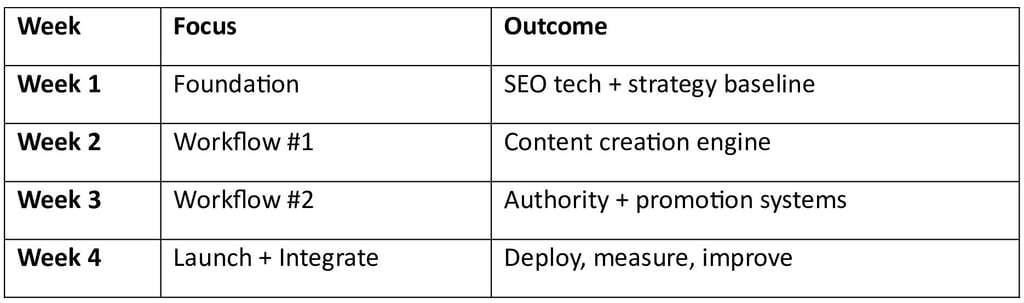
🚀 Week 1: Foundation — “Build the Core That Lasts”
The first week is all about laying a rock-solid groundwork so every future marketing, SEO, and monetization effort performs exponentially better.
🎯 Day 1–2 — Define Vision & Metrics
✔ Clarify your niche, target audience, and unique blog positioning — what value will you provide that no one else is?
✔ Write a mission statement, blog goals (traffic, subscribers, revenue) & KPI benchmarks for 30/60/90 days.
📌 Why it matters: Success without a clear north star leads to wasted effort.
🔎 Day 3–4 — Technical & SEO Setup
✔ Install Google Analytics + Google Search Console (verify ownership)
✔ Setup HTTPS, XML sitemap, robots.txt
✔ Ensure mobile-friendliness and fast loading speed
📌 Why it matters: These tools are your SEO engine. Without them, you can’t track performance or fix indexing issues.
🗺 Day 5–7 — Keyword & Competitor Research
✔ Use tools like Ahrefs/SEMRush/Google Trends to find relevant long-tail SEO keywords
✔ Build a keyword matrix — group keywords by intent (informational, transactional, navigational)
✔ Analyze top competitors — what keywords they rank for, what content formats perform best
📌 Impact: This research directly shapes your content strategy and CTR potential, because you know exactly what your audience is searching for.
🛠 Week 2: Build Workflow #1 — “Content Engine Activation”
Week 2 is dedicated to creating content systems that scale — processes you can reuse weekly without reinventing the wheel.
✍️ Day 8–10 — Content Planning & Templates
✔ Create at least 3 main content templates:
• SEO blog post format
• Listicles / how-to guides
• Lead-magnet landing page
✔ Develop content briefs (target keyword, title, meta, headers, CTAs)
📌 Why: Templates enforce quality and consistency, increasing CTR and session time.
🧠 Day 11–12 — Writing Workflow
✔ Set up a writing routine (daily targets, editorial calendar)
✔ Decide roles (writer/editor/SEO optimizer) and deadlines
✔ Use AI tools responsibly to augment drafts — NEVER replace expert insight
📌 Outcome: A predictable cadence for publishing without burnout.
✨ Day 13–14 — On-Page Optimization System
✔ Standardize checklist for optimizing content:
• Meta title + description with target keyword
• Header tags (H1/H2/H3) with keyword placement
• Internal linking map
📌Impact: Structured on-page optimization helps search engines understand relevance and boosts SERP click-through rates.
⚙️ Week 3: Build Workflow #2 — “Authority & Growth Infrastructure”
Now that content creation is systematic, Week 3 focuses on visibility building, community, and ranking acceleration.
🔗 Day 15–17 — Backlinks & Outreach Workflow
✔ List relevant niche blogs and forums
✔ Create outreach templates for guest posts
✔ Submit your blog URL to directories/community sites
📌 Why: Backlinks are still a core ranking signal — especially quality, contextual links.
📣 Day 18–19 — Social & Distribution Workflow
✔ Standardize repurposing (1 blog → 5 social posts)
✔ Schedule distribution for platforms where your niche lives (X, LinkedIn, Instagram, Pinterest etc.)
📌 Result: Higher referral traffic and signals that help search algorithms notice you faster.
💌 Day 20–21 — Email & Engagement Workflow
✔ Create a simple lead magnet (free checklist, cheat sheet, mini-ebook)
✔ Build an automated welcome email sequence
✔ Add sign-ups on every blog post
📌 Impact: Email lists are your true audience. Organic traffic fluctuates — email does not.
🏁 Week 4: Integrate and Launch — “Deploy, Monitor, Optimize”
Week 4 is where all workflows merge — your content, SEO, outreach, analytics, and growth systems all go live together.
🚀 Day 22–23 — Publish & Promote
✔ Publish at least 2–3 cornerstone blog posts
✔ Share on social profiles + relevant communities
✔ Run a focused promo (email announcement / social campaign)
📌 Goals: These launches should boost initial impressions and early indexing.
📊 Day 24–26 — Analytics & Iteration
✔ Check Search Console indexing status
✔ Study clicks, impressions, CTR, session duration
✔ Make quick improvements (titles, descriptions, internal links)
📌 Why: Early data guides optimization — blogs that don’t get clicks = rewrite titles / improve meta.
🔄 Day 27–28 — User-Feedback Loop
✔ Add simple feedback mechanisms (comments form / poll / quick survey)
✔ Note user friction & topics they request
✔ Use insights for next cycle planning
📌 Result: You’re building content with your audience, not just for them.
🏆 Day 29–30 — Reflect, Plan Next 30 Days
✔ Review KPIs vs goals
✔ Document what worked / flopped
✔ Create next cycle content calendar
📌 Essential: Reflection turns execution into compound growth.
📌 Summary: Weekly Breakdown
Section 5: Measuring Workflow Success ✓
Because automation without measurement is just expensive guesswork
AI automation workflows are not “set it and forget it” systems. For solopreneurs and digital creators in 2026, the real competitive edge comes from knowing exactly what’s working, what’s underperforming, and what’s generating real ROI.
In this section, we’ll break down how to measure workflow success like a pro, without drowning in analytics — using clear dashboards, realistic timelines, and a simple ROI framework that actually makes sense for solopreneurs.
1️ Dashboard Metrics to Track (The Non-Negotiables)
A common mistake solopreneurs make is tracking too many metrics. More data doesn’t mean more clarity. The goal is to track the right metrics — the ones that directly reflect growth, revenue, and time saved.
Here’s how elite solopreneurs build their AI workflow success dashboard:
🔹 A. Productivity & Time-Saving Metrics
AI automation exists to give you back time. If your workflow isn’t saving time, it’s failing — no matter how “advanced” it looks.
Track these core indicators:
⏱ Hours saved per week (before vs after automation)
🔁 Tasks automated per workflow
⚙️ Manual intervention frequency (lower is better)
📌 Example:
If your email follow-up automation saves 6–8 hours weekly, that’s 300+ hours per year — equivalent to hiring a virtual assistant without the salary.
🔹 B. Engagement & Performance Metrics
Automation should increase quality, not reduce authenticity.
Essential engagement metrics to monitor:
📩 Email open rates & click-through rates (CTR)
📈 Blog traffic growth from automated content workflows
💬 Comment replies & DMs handled by AI assistants
🎯 Lead magnet conversion rate
📌 Pro Insight:
Well-optimized AI workflows often increase CTR by 15–40% when paired with human-style prompts and personalization.
🔹 C. Revenue & Monetization Metrics
This is where Google AdSense, affiliates, and product funnels come into play.
Track revenue-focused KPIs:
💰 Revenue generated per automated workflow
📊 Cost per lead (before vs after automation)
🧠 AI-assisted upsell or cross-sell conversions
🖱 AdSense RPM improvement due to better content velocity
📌 For bloggers:
More consistent publishing + optimized internal linking = higher session duration, which directly improves AdSense earnings.
🔹 D. System Health Metrics
Even the best automation needs monitoring.
Watch for:
❌ Workflow failure rate
🔄 API errors or tool disconnects
⏳ Latency (delays in execution)
🧩 Prompt drift (AI outputs degrading over time)
A healthy workflow is quiet, reliable, and predictable.
2️ Expected Results by Timeline (What Success Really Looks Like)
One of the biggest SEO and business myths is expecting instant results from automation. AI workflows compound over time — just like SEO.
Here’s a realistic success timeline based on real-world solopreneur data:
🗓 0–30 Days: Foundation Phase
Initial workflow setup and testing
Minor errors and prompt optimization
Early signs of time savings
No major revenue spike yet (and that’s okay)
✅ Success signal:
Workflows run without daily fixes.
🗓 30–60 Days: Optimization Phase
Engagement metrics start improving
Email CTR and blog consistency increase
Reduced burnout and decision fatigue
Clear visibility into what workflows matter most
✅ Success signal:
You trust your systems enough to step back.
🗓 60–90 Days: Growth Phase
Measurable revenue impact
Improved Google rankings due to content velocity
AdSense RPM begins climbing
Lead nurturing becomes fully automated
✅ Success signal:
Your business grows even on days you don’t actively work.
🗓 90+ Days: Scale Phase
Predictable monthly results
Easy duplication of winning workflows
New income streams layered on top
Automation becomes your silent business partner
✅ Success signal:
You stop asking “Should I automate?” and start asking “What do I automate next?”
3️ The Solopreneur ROI Framework (Simple but Powerful)
Forget complex corporate ROI formulas. Solopreneurs need clarity, not confusion.
Here’s a clean, actionable ROI framework you can apply instantly:
🔹 Step 1: Calculate Total Automation Cost
Include:
AI tools (ChatGPT, Zapier, Make, CRM)
Automation platforms
Prompt engineering or setup time
📌 Example:
Total monthly automation cost = $80
🔹 Step 2: Calculate Tangible Returns
Add:
Revenue increase (ads, affiliates, products)
Hours saved × your hourly value
Reduced outsourcing or VA costs
📌 Example:
Extra revenue: $300
Time saved: 25 hours × $20/hr = $500
Total return = $800
🔹 Step 3: ROI Formula
ROI = (Total Return – Total Cost) ÷ Total Cost × 100
📌 Example:
ROI = (800 – 80) ÷ 80 × 100 = 900% ROI
That’s not magic. That’s smart automation.
🔹 Step 4: Non-Monetary ROI (Often Ignored, Always Valuable)
🧠 Reduced mental load
🔥 Consistent publishing without burnout
🚀 Faster execution
🕒 More freedom and creative space
These benefits don’t show up on spreadsheets — but they change your life.
Final Takeaway for The TAS Vibe Readers
AI automation success is not about flashy tools.
It’s about measurable impact, predictable growth, and sustainable freedom.
If your workflows:
Save time ✔
Improve engagement ✔
Increase revenue ✔
Reduce stress ✔
Then you’re not just using AI — you’re building a future-proof digital business.
🔥 Module 4 Preview & Hype Building: Where AI Automation Turns Into Real Results
Up to this point, you’ve learned what AI automation is, why it matters, and how to build powerful workflows as a solopreneur.
But let’s be honest for a moment.
Knowledge feels good.
Proof feels better.
That’s exactly where Module 4 steps in — the turning point where theory meets execution, and automation stops being “interesting” and starts becoming profitable.
Module 4 isn’t about tools.
It’s about outcomes.
✅ Why Module 4 Is the Most Anticipated Part of the Course
Most AI courses fail at one critical point:
They teach possibility, not reality.
Module 4 is designed differently.
Instead of abstract explanations, it delivers real-world case studies that show how AI automation works inside actual solopreneur businesses—with limited time, zero teams, and realistic budgets.
This module exists to answer one core question every smart reader has:
“Will this actually work for someone like me?”
And the answer is shown—not promised.
📊 Four Real Case Studies (Teased, Not Spoiled)
Without giving everything away, Module 4 walks you through four highly practical automation case studies, each targeting a different solopreneur model.
Here’s a sneak peek 👇
🔹 Case Study 1: The Content Creator Who Scaled Without Burning Out
Discover how a solo blogger automated content research, drafting, optimization, and distribution—saving 25+ hours per week while increasing organic traffic.
🔹 Case Study 2: The Coach Who Automated Client Acquisition
See how AI-powered lead magnets, email workflows, and CRM automations turned cold traffic into warm, booked calls—without paid ads.
🔹 Case Study 3: The eCommerce Solopreneur Who Reduced Manual Work by 60%
Learn how product descriptions, customer support replies, inventory alerts, and remarketing flows were automated to increase conversions and reduce friction.
🔹 Case Study 4: The Freelancer Who Built a “Silent Sales System”
Explore how AI automation created a 24/7 sales engine that nurtured leads, sent proposals, followed up automatically, and closed deals while the owner slept.
Each case study focuses on before vs after, not hype.
🧠 What Module 4 Really Provides (Proof of Concept)
Module 4 is your validation layer.
It proves that:
AI automation works without a team
You don’t need advanced coding skills
Small, focused workflows outperform complex systems
Automation compounds over time when done correctly
Instead of saying “AI can do this”, Module 4 shows:
Exactly what was automated
Which tools were used
Why those decisions worked
What mistakes were avoided
This is where confidence replaces confusion.
🔗 The Natural Bridge to the Next Module
Once you’ve seen AI automation working in real businesses, something shifts.
You stop asking:
“Should I do this?”
And start asking:
“How do I customize this for my exact niche?”
That mindset shift is intentional.
Module 4 prepares you mentally and strategically for the next stage—where workflows become personalized, scalable, and optimized for long-term growth.
The next module doesn’t feel like a jump.
It feels like the obvious next step.
🚀 Anticipation, Not Pressure
There’s no urgency trick here.
No countdown timers.
No exaggerated promises.
Module 4 simply does what great education should do:
✔ Removes doubt
✔ Builds belief
✔ Sparks clarity
✔ Makes the future feel achievable
If Modules 1–3 gave you the map,
Module 4 shows you people who already walked the road.
And once you see that—it’s hard not to imagine yourself next.
✍️ Final Thought for The TAS Vibe Readers
Automation isn’t about replacing effort.
It’s about redirecting effort to where it matters most.
Module 4 is the proof that this shift is not only possible—but practical.
And the best part?
You’re just getting started. 🔁
Connect
Stay updated with us
Follow
Reach
+91 7044641537
© 2025. All rights reserved.