
IAM Implementation Steps: Complete 2026 Roadmap for SMBs & Enterprises – From Planning to Full Deployment
Identity and Access Management (IAM) is no longer optional—it’s a business-critical security foundation for 2026 and beyond. In this in-depth guide, IAM Implementation Steps: Complete 2026 Roadmap for SMBs & Enterprises, The TAS Vibe walks you through a practical, end-to-end IAM journey—from initial planning and risk assessment to full deployment and continuous optimization. This post explains how small businesses, mid-sized organizations, and large enterprises can design a scalable IAM framework aligned with Zero Trust principles, adaptive authentication, and modern compliance requirements. You’ll learn how to define IAM goals, select the right tools, integrate cloud and on-premise systems, manage user lifecycles, and enforce least-privilege access without disrupting productivity. Whether you’re an IT leader, security architect, cloud engineer, or business owner, this roadmap helps you reduce breach risks, improve regulatory compliance, and maximize ROI from your IAM investments. Real-world implementation insights, best practices, and future-ready strategies make this guide ideal for organizations planning IAM adoption or upgrading existing access control systems. Stay ahead of evolving cyber threats and identity-based attacks with a structured IAM approach built for 2026. Follow The TAS Vibe for expert-driven cybersecurity insights, IAM best practices, and actionable technology strategies designed for modern businesses.
TECHNOLOGY
The TAS Vibe
1/6/202621 min read
My post content
IAM Implementation Steps: Complete 2026 Roadmap for SMBs & Enterprises – From Planning to Full Deployment


SECTION 1: Introduction & Context Setting
Opening Hook: Why Identity Is the Weakest Link
In 2025, compromised credentials are responsible for more security breaches than any other attack method, outpacing malware, ransomware, and zero-day exploits combined. The most alarming part is not the sophistication of attackers—it is the lack of visibility within organizations themselves. Nearly three out of four businesses still do not have proper identity governance in place. This means many organizations cannot confidently answer simple but critical questions such as: Who currently has access to sensitive customer data? or When was a third-party contractor’s access last reviewed?
When identity is unmanaged, security becomes guesswork. And in today’s threat landscape, guesswork leads directly to breaches, regulatory penalties, and reputational damage.
The Core Problem: A Growing Identity Crisis
Modern organizations operate in complex, hybrid environments where identity sprawl is unavoidable. Most businesses now rely on dozens—or even hundreds—of cloud-based applications, each with its own access model. At the same time, legacy on-premises systems continue to run critical workloads, often disconnected from modern identity platforms.
This complexity is further amplified by temporary users such as contractors, vendors, partners, and automated service accounts. Access is frequently granted quickly to meet business demands but rarely reviewed or removed on time. Manual approval workflows slow productivity, while offboarding mistakes leave orphaned accounts active long after employees leave.
Adding pressure to this environment are strict compliance mandates like SOX, HIPAA, and GDPR, which require organizations to prove that access to sensitive data is controlled, auditable, and regularly reviewed. Without a structured Identity & Access Management strategy, meeting these requirements becomes nearly impossible.
Why This IAM Guide Matters
This article is designed for organizations actively planning or evaluating IAM implementation. It removes the complexity and confusion often associated with identity projects and replaces it with a clear, practical roadmap.
Whether you are a small business deploying IAM for the first time or a growing enterprise modernizing legacy access controls, this guide walks you through IAM implementation step by step—from initial assessment to full production rollout.
SECTION 2: What Is IAM Implementation? Foundational Context
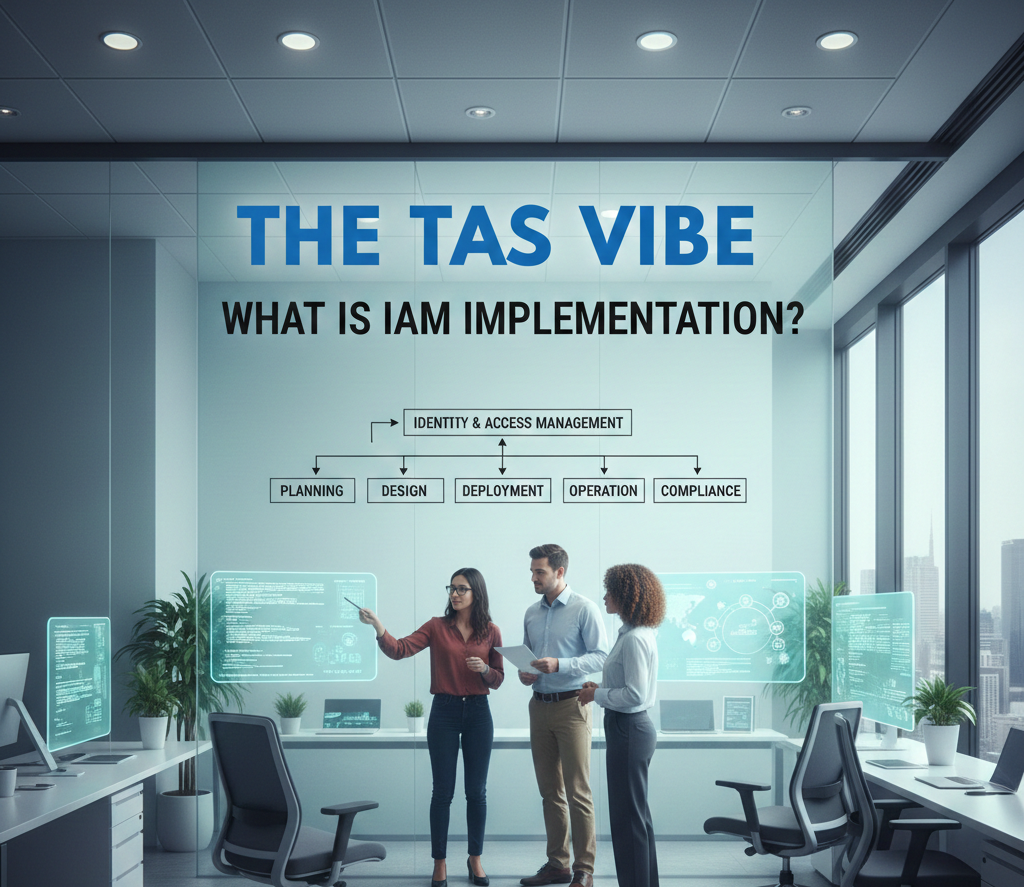
Identity and Access Management (IAM) implementation is one of the most critical yet misunderstood initiatives in modern cybersecurity. Many organizations assume IAM is simply a software deployment. In reality, IAM implementation is a strategic transformation of how access is granted, monitored, and controlled across an organization.
Understanding this foundation is essential before selecting tools, migrating users, or enforcing new authentication policies.
2.1 Defining IAM Implementation
IAM implementation refers to the structured process of deploying identity technologies, policies, and workflows to control who can access systems, data, and applications—under what conditions and with what level of oversight.
At its core, IAM implementation answers four fundamental questions:
Who is requesting access?
What are they allowed to access?
Under which conditions is access granted?
How is access logged, reviewed, and audited?
Importantly, IAM implementation is not about purchasing a product. It is about building a repeatable, auditable access control framework that scales with business growth and regulatory demands.
The Three Core Elements of IAM Implementation
1. Identity Provisioning
Identity provisioning manages the entire user lifecycle. This includes creating accounts when users join, modifying access when roles change, and revoking access immediately when users leave. Without automated provisioning, organizations accumulate orphaned accounts and excessive permissions—both major security risks.
2. Authentication Enforcement
Authentication ensures that users are who they claim to be. Modern IAM implementation moves beyond passwords toward multi-factor authentication (MFA), device trust, and adaptive authentication methods. This dramatically reduces the risk of phishing, credential theft, and account compromise.
3. Authorization and Governance
Authorization defines what users are allowed to do once authenticated. Governance ensures access aligns with job roles and business needs. Regular access reviews, approval workflows, and audit logs ensure compliance and reduce insider risk.
A Critical Misconception
One of the most common misunderstandings is believing that IAM implementation equals buying a platform such as Okta or Microsoft Entra. In practice, technology represents only about 20% of the effort. The remaining 80% involves process design, role modeling, data cleanup, stakeholder alignment, and ongoing governance.
2.2 Why Organizations Implement IAM in 2026
The importance of IAM implementation continues to grow as organizations face increasing regulatory, security, and operational pressure.
Driver 1: Regulatory and Compliance Requirements
Modern regulations explicitly demand proof of access control and identity governance. For example:
GDPR requires organizations to demonstrate who accessed personal data and for what purpose.
HIPAA mandates controlled access and regular reviews of healthcare information.
SOX enforces segregation of duties in financial systems.
DORA requires European firms to demonstrate digital resilience and access governance.
NIS2 mandates structured identity lifecycle management across critical sectors.
Without a formal IAM implementation, meeting these compliance obligations becomes nearly impossible.
Driver 2: Security Breaches and Insider Risk
Many breaches are not caused by advanced malware but by poor access control. Examples include inactive accounts remaining enabled, overprivileged administrators, or unmanaged service accounts.
IAM implementation provides continuous visibility into who has access, significantly reducing the likelihood of undetected misuse or long-term compromise.
Driver 3: Operational Efficiency and Cost Reduction
Manual access management is expensive and slow. Industry data shows that manual provisioning can cost over $200 per user per year in IT labor. Automated IAM workflows reduce that cost dramatically while improving accuracy.
Organizations that implement automated IAM processes often reduce access request turnaround times from days or weeks to minutes or hours, improving employee productivity and satisfaction.
Driver 4: Digital and Cloud Transformation
Cloud migration, SaaS adoption, and DevOps practices introduce identity complexity that legacy systems cannot handle. IAM implementation becomes the foundation of cloud security, enabling consistent access control across hybrid and multi-cloud environments.
2.3 Common IAM Implementation Mistakes to Avoid
Understanding common pitfalls can prevent costly failures and delays.
Mistake 1: The “Big Bang” Approach
Attempting to migrate all users, applications, and policies at once often leads to system instability and user resistance. A phased rollout—starting with high-risk systems—produces better results.
Mistake 2: Tool-First Thinking
Selecting IAM software before defining processes leads to misconfigured systems that automate poor practices. Successful IAM implementation starts with process design, not technology.
Mistake 3: Ignoring Change Management
IAM affects how employees log in and work daily. Without proper communication and training, adoption suffers. User experience and education are as important as technical controls.
Mistake 4: Uncontrolled Scope Expansion
Trying to manage every identity immediately increases complexity. A focused scope—prioritizing critical systems and privileged users—creates early success and builds momentum.
Mistake 5: Skipping Data Cleanup
Migrating inaccurate or outdated identity data undermines IAM effectiveness. Data quality must be addressed early to ensure clean role definitions and reliable governance.
SECTION 3: The Complete 5-Phase IAM Implementation Roadmap for 2026
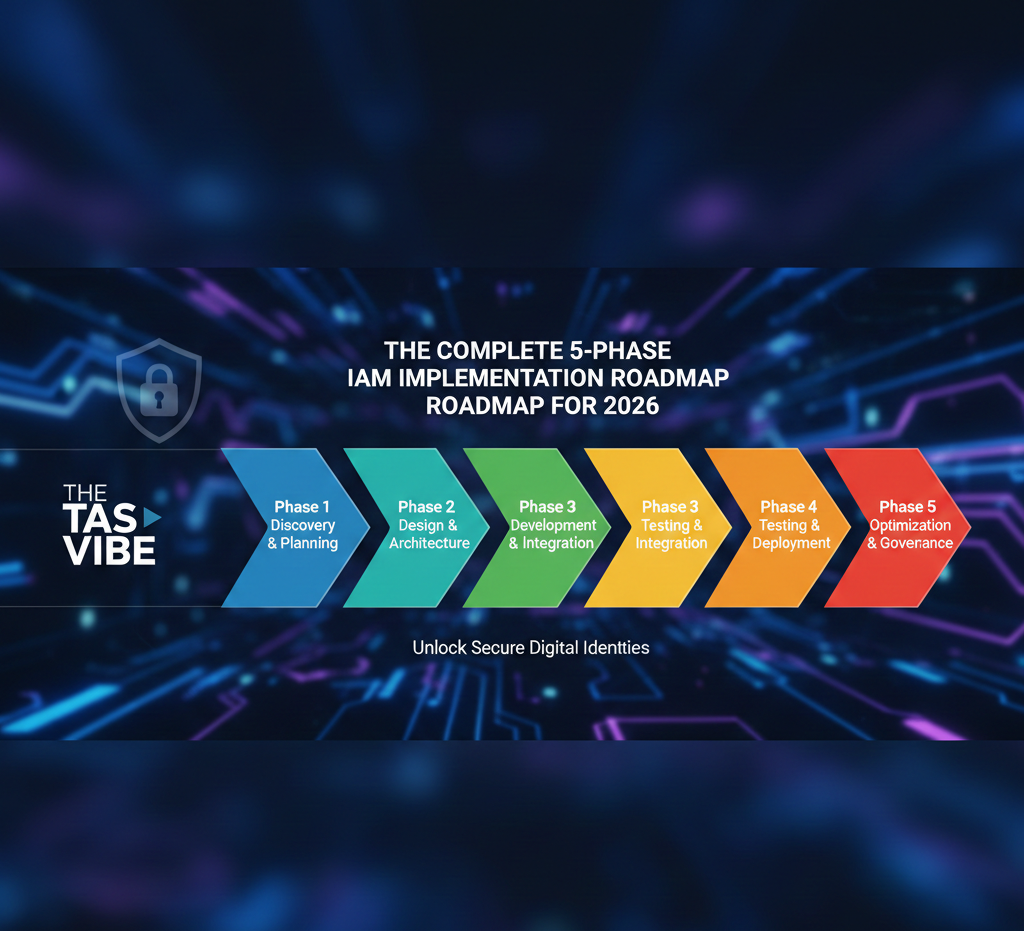
Implementing Identity & Access Management (IAM) is not a single technology project—it is a strategic transformation of how access is granted, controlled, monitored, and governed across an organization. In 2026, IAM is the foundation of cybersecurity, compliance, and digital trust.
This five-phase IAM roadmap provides a structured, real-world implementation approach suitable for startups, SMBs, and large enterprises. Each phase builds maturity, reduces risk, and delivers measurable business value.
PHASE 1: Discovery & Assessment (4–8 Weeks)
Purpose
Before designing a future IAM architecture, you must fully understand your current environment. You cannot secure identities you cannot see, and you cannot govern access you do not understand.
3.1.1 Conduct a Comprehensive Identity Inventory
The first practical step in IAM implementation is cataloging every identity, system, and access relationship across the organization.
What You Must Inventory
Identities
Employees (full-time, part-time)
Contractors, vendors, partners
Service accounts and automation identities
APIs, bots, IoT devices, non-human identities
Systems and Applications
Cloud applications (Microsoft 365, Salesforce, Slack, GitHub)
On-premises systems (ERP, file servers, databases)
Custom or legacy applications
Data Repositories
Databases
File shares
Cloud storage (S3, OneDrive, SharePoint)
APIs and integrations
Access Controls
Who has access to what
How access is granted and revoked
Whether permissions match job responsibilities
Why This Matters
Most organizations underestimate identity sprawl. Over time, access accumulates silently. Without an inventory, IAM decisions are based on assumptions rather than facts.
SMB Reality Example
A mid-size marketing agency discovers dozens of contractors still have access to paid SaaS tools months after their contracts ended—creating unnecessary cost and security risk.
Enterprise Reality Example
A financial enterprise uncovers hundreds of users with excessive privileges caused by role changes never reflected in access systems.
3.1.2 Assess Current Access Control Processes
Once identities are visible, the next step is documenting how access is managed today.
Key questions to answer:
How is access provisioned for new hires?
Is authentication password-only or MFA-enabled?
Are access roles defined, documented, and enforced?
When was the last access review conducted?
Is offboarding automated or manual?
Common Red Flags
Access provisioning takes days or weeks
Offboarding depends on manual reminders
No written access control policies
Orphaned accounts discovered accidentally
No regular audits or reviews
These indicators signal urgent IAM modernization needs.
3.1.3 Identify Security and Compliance Gaps
Assessment naturally reveals gaps that increase breach risk and audit exposure.
Typical Security Gaps
Excessive privileges
Orphaned and dormant accounts
No MFA enforcement
Missing logs or audit trails
Shadow IT usage
Typical Compliance Gaps
No documented access policies
No segregation of duties
No access certifications
No identity incident response plan
Early identification prevents costly remediation later.
3.1.4 Stakeholder Engagement and Project Kickoff
IAM affects the entire organization. Success depends on early stakeholder alignment.
Key participants:
IT and Security teams
Compliance and Risk officers
Business leaders and department heads
HR (identity lifecycle authority)
Finance (budget ownership)
Phase 1 Outcome
A shared understanding of current risk, scope, priorities, and executive sponsorship.
PHASE 2: Planning & Prioritization (4–6 Weeks)
Purpose
Transform assessment findings into a clear, funded, and executable IAM roadmap.
3.2.1 Define IAM Goals and Business Case
IAM must solve business problems, not just technical ones.
Common IAM Goals
Faster onboarding
Reduced security incidents
Audit readiness
Lower helpdesk workload
Least-privilege enforcement
Quantifying benefits builds executive buy-in and funding approval.
3.2.2 Create a Step-by-Step Implementation Plan
Planning defines:
Scope (what comes first)
Timeline
Resource requirements
Technology alignment
Risk prioritization
High-risk systems and identities should always be addressed first.
3.2.3 Solution Selection and Vendor Evaluation
IAM tools enable strategy—but do not replace it.
Selection criteria include:
Feature completeness
Integration capability
Scalability
User experience
Cost and vendor stability
Choosing the right platform prevents costly re-implementations later.
PHASE 3: Foundation & Quick Wins (8–16 Weeks)
Purpose
Deliver immediate value while building technical foundations.
3.3.1 Single Sign-On (SSO)
SSO improves security and user experience instantly. Users authenticate once and securely access multiple systems.
Benefits:
Fewer passwords
Faster access
Reduced phishing risk
Higher user satisfaction
SSO is often the first visible success of IAM programs.
3.3.2 Multi-Factor Authentication (MFA)
MFA blocks the vast majority of credential-based attacks.
Best practice:
Start with authenticator apps
Phase enforcement gradually
Prioritize admins and sensitive systems
MFA adoption is one of the highest-ROI IAM controls.
3.3.3 Automated Provisioning and Deprovisioning
Automation ensures access matches employment status.
Key outcomes:
Day-1 productivity
Immediate offboarding
Fewer errors
Lower insider threat risk
IAM connected to HR systems creates a reliable identity lifecycle.
3.3.4 Identity Data Centralization
IAM becomes the single source of truth.
Centralized identity data enables:
Accurate access decisions
Consistent enforcement
Clean audit trails
Reduced duplication
PHASE 4: Governance & Scale (12–20 Weeks)
Purpose
Move from basic access control to enterprise-grade governance.
3.4.1 Role-Based Access Control (RBAC)
RBAC replaces manual permission management with scalable role models.
Benefits:
Simplified administration
Least-privilege enforcement
Faster onboarding
Audit readiness
RBAC is essential for organizations with hundreds or thousands of users.
3.4.2 Access Reviews and Certifications
Regular access reviews ensure permissions remain appropriate over time.
Automated reviews:
Reduce audit risk
Detect access creep
Enforce accountability
3.4.3 Segregation of Duties (SoD)
SoD prevents fraud by separating critical functions.
IAM enforces SoD by:
Blocking conflicting roles
Detecting violations
Documenting remediation
3.4.4 Cloud and Multi-Cloud IAM Governance
As cloud adoption grows, IAM must unify access across platforms.
Federated identity provides:
Single login
Consistent policies
Centralized auditing
PHASE 5: Optimization & Maturity (Ongoing)
Purpose
Evolve IAM from managed to intelligent and adaptive.
3.5.1 Real-Time Monitoring and Anomaly Detection
Continuous monitoring detects threats before damage occurs.
Signals include:
Unusual login behavior
Privilege escalation
Data exfiltration patterns
3.5.2 Identity Threat Detection and Response
Modern attacks target identity directly.
Advanced IAM integrates:
Behavioral analytics
Risk scoring
Threat intelligence
3.5.3 Continuous Improvement
IAM maturity requires constant refinement.
Key metrics:
Provisioning time
MFA adoption
Review completion
Detection and response speed
User satisfaction
Optimization ensures IAM evolves with business and threat landscapes.
SECTION 4: IAM Implementation Checklists & Quick-Start Guides (Practical, Real-World Approach)
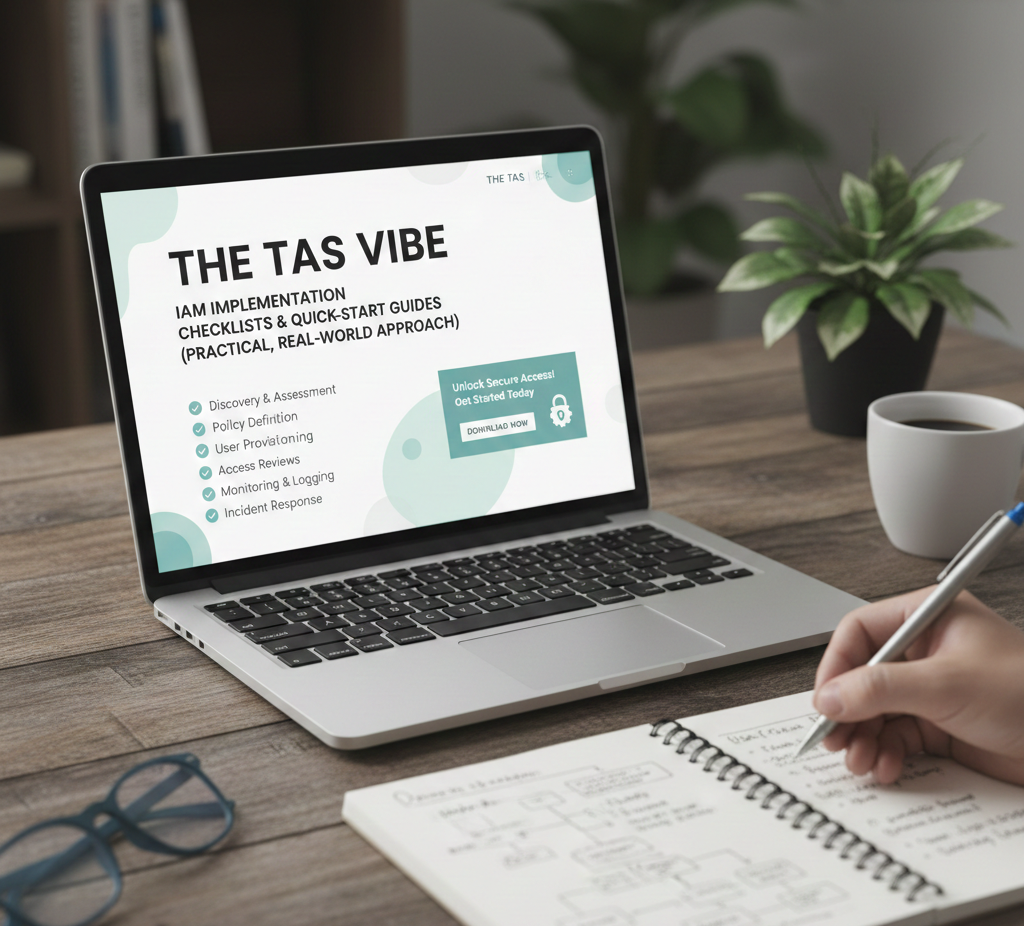
Implementing Identity & Access Management (IAM) can feel overwhelming—especially for organizations with limited experience, budget constraints, or complex IT environments. This section breaks IAM implementation into clear, actionable steps, designed for beginners, SMBs, and growing enterprises alike.
Whether you are launching IAM for the first time or formalizing an existing approach, these checklists and examples will help you move from planning to execution with confidence.
4.1 IAM Implementation Steps Checklist for Beginners
For organizations at an early stage of IAM maturity, success depends on structure, stakeholder alignment, and clarity of scope. Rushing into tool deployment without preparation often leads to failure.
Pre-Phase 1: Planning & Alignment (Week 1–2)
The first two weeks should focus on organizational readiness, not technology.
Start by securing executive sponsorship and budget approval. IAM impacts security, compliance, productivity, and business continuity—executive backing ensures decisions are enforced across departments.
Next, identify key stakeholders from IT, security, compliance, HR, and business units. Schedule a kick-off meeting to define expectations and assign a project lead responsible for delivery.
Clearly define the initial scope:
Which users are included?
Which applications or systems are in scope?
What problems are you trying to solve first?
Finally, communicate why IAM matters to the workforce. Employees are more likely to adopt SSO and MFA when they understand the security and usability benefits.
Phase 1: Discovery & Risk Assessment
This phase focuses on visibility—understanding who has access to what and why.
Document all identity types, including employees, contractors, partners, and service accounts. Create a complete inventory of applications, cloud services, and on-prem systems.
Map existing access processes:
How are users onboarded?
How is access removed when employees leave?
Are access reviews conducted?
Identify security gaps such as missing MFA, shared accounts, lack of audit logs, or excessive privileges. At the same time, identify compliance gaps—missing policies, undocumented processes, or lack of review evidence.
Interview stakeholders to uncover pain points and business needs. The outcome of this phase should be a risk and gap assessment report that clearly explains why IAM change is necessary.
Phase 2: Strategy, Business Case & Vendor Selection
Once gaps are identified, define clear IAM program goals. Limit objectives to 3–5 measurable outcomes such as:
Reduce provisioning time
Improve audit readiness
Enforce least-privilege access
Develop a business case that links IAM investment to risk reduction, operational efficiency, and cost savings. Build an 18-month roadmap that prioritizes high-risk systems and high-volume users first.
Estimate budget requirements, including tool licensing, implementation services, and internal effort. Evaluate 3–5 IAM vendors based on integration capabilities, security features, scalability, and cost.
Select a vendor, finalize contracts, and allocate internal resources—including a project manager, technical lead, and change owner.
Phase 3: Foundation & Quick Wins
This phase delivers visible results that build confidence.
Start with a pilot deployment of Single Sign-On (SSO) for a small group of users. Gather feedback, refine configurations, and then roll out SSO department by department.
Implement Multi-Factor Authentication (MFA) first for privileged accounts, then expand to all users. Automate provisioning and offboarding by integrating IAM with the HR system to ensure access is granted and revoked automatically.
Centralize identity data to remove duplicates and inconsistencies. Train users and IT support teams to reduce friction and support tickets.
Success metrics should include:
SSO adoption above 90%
MFA adoption above 85%
Provisioning time reduced by at least 70%
4.2 IAM Quick-Start Guide for SMBs (Step-by-Step)
Small and mid-sized businesses often face limited budgets and IT capacity. The key is focus and simplicity.
Months 1–2: Discovery & Planning
Limit scope to your top three critical applications, such as email, finance, and HR systems. Inventory users and define who needs access to what.
Identify one core problem to solve—for example, reducing password resets using SSO. Cloud IAM solutions typically cost $5–15 per user per month, making them affordable for SMBs.
Months 3–4: Deploy Single Sign-On
Choose a cloud IAM provider such as Okta, Microsoft Entra, or Auth0. Start with email and one or two additional apps.
Pilot the solution with a small group of power users, then roll it out to everyone. Aim for 90% adoption and a noticeable reduction in “forgot password” requests.
Month 5: Enable MFA
Select one simple MFA method, such as an authenticator app. Make MFA mandatory for IT and admin accounts first, then expand to all users.
Provide clear instructions and backup recovery options. A successful rollout typically results in 95% adoption with minimal support tickets.
Months 6–7: Automate Provisioning
If your IAM and applications are cloud-based, enable automated user provisioning. New hires should receive access automatically when added to the HR system.
This dramatically improves onboarding speed and reduces IT workload.
Month 8+: Access Reviews & Governance
Introduce quarterly access reviews. Managers confirm whether users still need their current permissions. This can be done using simple workflows without expensive governance tools.
The goal is to keep orphaned accounts below 1% and ensure access remains aligned with job roles.
4.3 IAM Implementation Examples: Real-World Scenarios
Scenario A: Financial Services Firm (500 Employees)
This organization struggled with audit failures, slow access provisioning, and unmanaged contractor access. Over 12 months, they implemented SSO, MFA, automated provisioning, and access reviews using a leading IAM platform.
The result: audits passed successfully, provisioning time dropped from six hours to 30 minutes, and compliance confidence improved significantly.
Scenario B: 40-Person Startup
A fast-growing startup faced password sprawl and delayed onboarding. In just three months, they deployed SSO and MFA, automated access for new hires, and eliminated shared credentials.
Employees were happier, security improved, and productivity increased—with minimal IT overhead.
4.4 Complete IAM Implementation Roadmap for 2026
Resource Planning by Organization Size
Small organizations (50–200 users) typically need around two full-time equivalents (FTEs) combined with vendor support, with costs ranging from $50K to $150K.
Mid-size organizations (200–1,000 users) require dedicated project management, technical architects, and change management, with total costs between $300K and $800K.
Enterprises (1,000+ users) operate IAM as a formal program, involving 12–20 FTEs, advanced analytics, and AI-driven capabilities, with budgets exceeding $1 million.
Organizations that follow this roadmap consistently progress from a “managed” IAM maturity level to an advanced, intelligence-driven identity security posture.
SECTION 5: PRACTICAL IAM IMPLEMENTATION STEPS FOR IT TEAMS

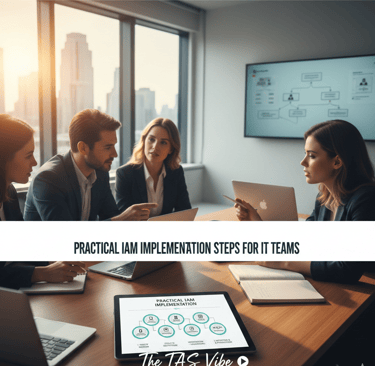
Implementing an Identity and Access Management (IAM) solution is not a plug-and-play activity. It is a multi-stage technical transformation that directly impacts security, compliance, and daily user productivity. For IT teams, success depends less on the tool itself and more on planning, execution discipline, and post-deployment optimization.
This section provides a step-by-step, real-world IAM implementation roadmap designed specifically for IT administrators, security engineers, and infrastructure teams.
5.1 Pre-Deployment Tasks: What IT Must Do Before Go-Live
Before a single employee logs into the new IAM system, IT teams must prepare the underlying infrastructure. Skipping these steps often leads to downtime, user lockouts, and security gaps.
Network and Infrastructure Readiness
The first decision is deployment architecture.
For most organizations, cloud-based IAM is recommended due to scalability, built-in redundancy, faster updates, and lower operational overhead. IT teams should select appropriate cloud regions based on user geography and regulatory requirements, and decide whether single-region or multi-region redundancy is needed for high availability.
For on-premises deployments, IT must provision servers, load balancers, storage, and backup systems. This option requires greater ongoing maintenance and disaster recovery planning.
Regardless of deployment type, the network must support authentication traffic without latency. Firewalls should allow IAM traffic, and bandwidth must be sufficient to handle peak login periods.
DNS entries should be created for IAM endpoints such as auth.company.com or idp.company.com, ensuring clean and consistent access paths. SSL/TLS certificates must be installed to encrypt authentication traffic and prevent man-in-the-middle attacks.
Integration Planning
IAM does not operate in isolation. IT teams must create a complete inventory of systems that will integrate with the new IAM platform. This includes SaaS applications, internal web apps, VPNs, legacy systems, and custom software.
Each integration must be mapped to the correct protocol—SAML, OAuth, OpenID Connect, LDAP, or custom APIs. Testing should always occur in a staging or lab environment before production rollout. If custom development is required, it should be identified early to avoid deployment delays.
Data Migration Planning
User identity data often exists in multiple systems such as Active Directory, HR platforms, or legacy IAM tools. Before migration, IT must clean this data—removing duplicates, correcting malformed attributes, and validating email addresses.
A clear attribute-mapping plan is essential. For example, how a user’s department or job role maps from the old system to the new IAM platform. To minimize risk, migrations should be phased, not executed all at once.
Security Hardening Before Launch
High availability must be configured from day one, including failover and redundancy. Default security policies should enforce strong passwords with mandatory change on first login.
Audit logging must be enabled to capture authentication and authorization events for compliance and incident response. Backup and disaster recovery procedures should be tested, and IT should define a fallback plan in case the IAM system becomes temporarily unavailable.
5.2 Deployment Execution: Step-by-Step Rollout for IT Teams
A structured rollout timeline significantly reduces risk and user disruption.
Week 1: Infrastructure Readiness
IT deploys the IAM infrastructure, configures networking, DNS, certificates, and monitoring tools. Administrative accounts are created for initial configuration. A documented manual authentication fallback process is prepared in case of early failures.
Week 2: Configuration and First Integration
Authentication policies are configured, including MFA rules, session timeouts, and access conditions. The IAM system is integrated with a critical application—often email—to validate real-world authentication. Test users are created, and automated provisioning is enabled if HR integration exists.
Week 3: Pilot Data Migration
A controlled pilot group of 200–500 users is migrated. These users represent different departments and access levels. IT monitors login success, application access, and performance. Feedback is collected and adjustments are made. A successful pilot typically achieves 95% or higher success without critical issues.
Week 4–5: Expanding Application Integrations
Additional applications such as CRM tools, collaboration platforms, and developer systems are added to single sign-on. Each integration is tested thoroughly before production use.
Week 6: Scaling to Production
Larger user batches are migrated gradually to avoid overwhelming support teams. Policies are refined based on real usage patterns.
Week 7–8: Full Production Rollout
All users are now managed by the new IAM system. Automated provisioning and deprovisioning are fully operational, and support requests stabilize.
5.3 Go-Live Support and Troubleshooting
Even with perfect planning, issues will occur. Effective support determines user confidence.
Common IAM Issues and Resolutions
Password resets are handled through self-service recovery, reducing helpdesk workload dramatically. Application access issues are often traced to incorrect SAML mappings and resolved quickly.
MFA problems are mitigated using backup authentication methods such as authenticator apps or recovery codes. Account lockouts are handled via secure email verification, with manual recovery as a last resort.
Access denial is typically a role assignment issue, resolved once managers confirm correct access rights.
Support Team Readiness
Helpdesk teams must be trained on IAM basics and provided with troubleshooting runbooks. Ticket volumes usually spike during rollout but should drop within two weeks. A well-executed deployment sees less than 5% of users needing support.
5.4 Post-Deployment Optimization and Continuous Improvement
IAM implementation does not end at go-live. Continuous optimization enhances both security and user experience.
Stabilization Phase (Weeks 9–12)
IT monitors authentication performance, uptime, and error rates. User feedback is reviewed to eliminate unnecessary friction. Automated provisioning and deprovisioning workflows are validated, and quarterly access reviews are initiated.
Advanced IAM Capabilities (Month 4 and Beyond)
Organizations can introduce risk-based authentication, passwordless login methods, real-time anomaly detection, and SIEM integration. IAM expands to cover cloud infrastructure, third-party access, and machine identities.
Key Metrics to Track
Successful IAM programs measure:
Authentication success rates above 99.9%
High MFA adoption for privileged users
Rapid provisioning and deprovisioning times
Strong user satisfaction scores
SECTION 6: Role-Based Access Control (RBAC) Implementation
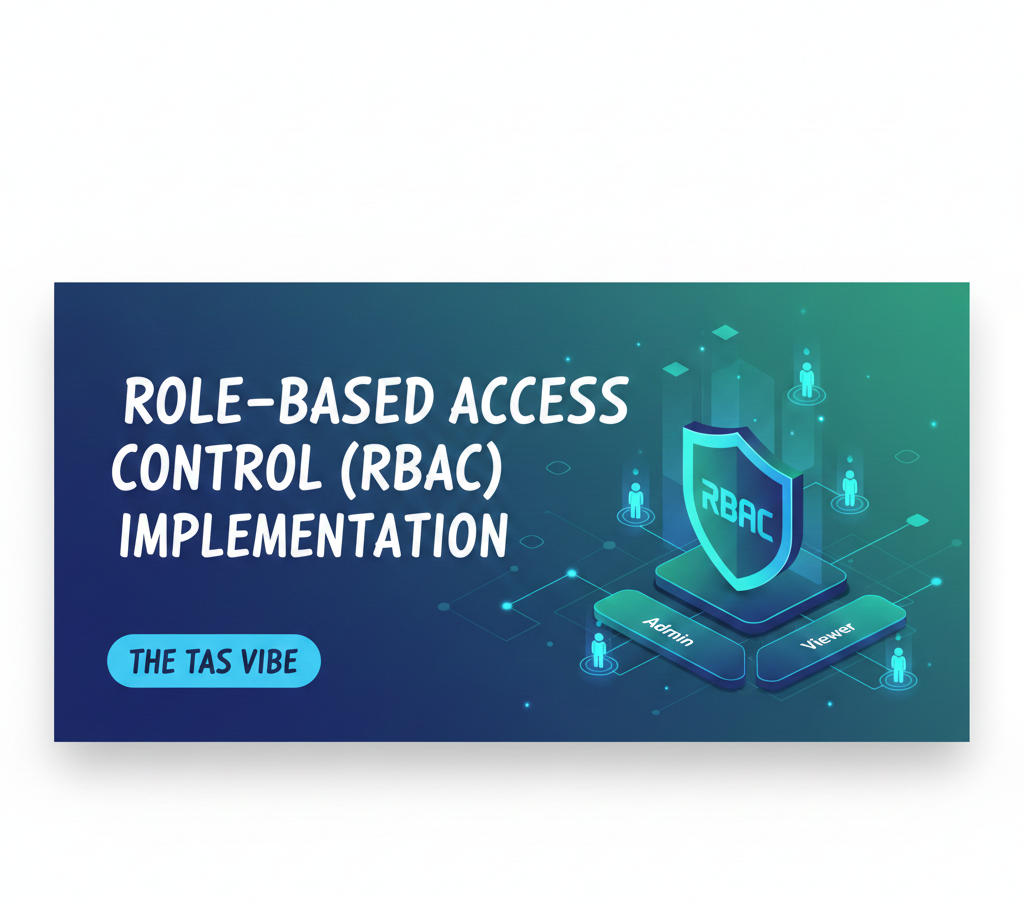
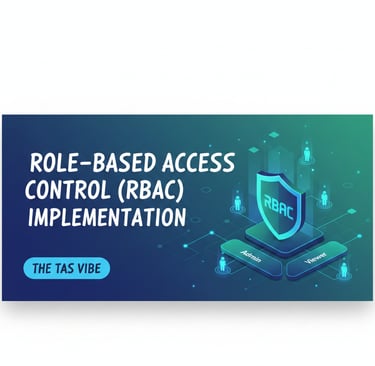
Role-Based Access Control (RBAC) is one of the most critical pillars of a modern Identity and Access Management (IAM) strategy. Without RBAC, access management quickly becomes chaotic, insecure, and impossible to scale. With RBAC, organizations can enforce least-privilege access, simplify compliance, and reduce security risk while improving operational efficiency.
This section explains how to design, implement, test, and maintain RBAC in a real-world enterprise environment, step by step.
IAM Implementation with Role-Based Access Control
RBAC works by assigning permissions to roles, not individuals. Users inherit access based on their job function, making access control predictable, auditable, and manageable at scale. This approach is essential for cloud environments, hybrid infrastructure, and regulated industries.
Subsection 6.1: Role Hierarchy Design
A successful RBAC implementation begins with a well-structured role hierarchy that mirrors how the organization actually works.
Step 1: Identify Base Roles
Start by identifying the core job functions across the organization. This should be a collaborative process involving IT, HR, compliance teams, and business leaders. The key question to ask is:
“What does this person do every day to perform their job?”
Avoid designing roles based on people’s names or historical access. Focus strictly on job responsibilities.
Example: Technology Company Role Structure
Individual Contributors
Software Engineer, QA Analyst, UX Designer, Data AnalystTeam Leads
Engineering Lead, QA Lead, Design LeadManagers
Engineering Manager, Product Manager, Operations ManagerDirectors
Director of Engineering, Director of Product, Director of OperationsExecutives
CTO, VP of Engineering, C-Suite
Example: Financial Services Role Structure
Front-Line Staff
Teller, Loan Officer, Customer Service RepresentativeSupervisors
Teller Supervisor, Loan Officer LeadManagers
Branch Manager, Operations Manager, Compliance ManagerDirectors
Director of Lending, Director of ComplianceExecutives
CFO, CRO, CEO
Designing roles at this level ensures clarity and prevents role explosion later.
Step 2: Define Responsibilities Per Role
Once roles are identified, define exactly what systems, applications, and data each role requires—nothing more, nothing less.
Example: Software Engineer Role
GitHub: Access to code repositories, ability to merge approved branches
Jira: Create and manage tickets, view sprint plans
AWS: Development environment access only
Slack: Team and project channels
Google Drive: Shared team documentation
CI/CD Tools: Trigger builds, view logs
Example: QA Analyst Role
GitHub: Read-only access for code understanding
Jira: Create and manage test cases
AWS: Test environment access only
Test Management Tools: TestRail, Zephyr
Slack: QA-specific channels
Google Drive: Test documentation
Example: Finance Manager Role
Financial Systems (SAP, NetSuite): Full ledger access, approval authority up to defined limits
HR System: Payroll visibility, expense approvals
Budgeting Tools: Create and approve budgets
Reporting Tools: Access financial dashboards
Email: Finance team communications
This step enforces least privilege and directly supports compliance requirements such as SOX, ISO 27001, and GDPR.
Step 3: Define Role Hierarchy and Inheritance
RBAC becomes powerful when roles inherit permissions logically. Senior roles automatically include permissions from junior roles, plus additional authority.
Example: Engineering Role Hierarchy
CTO (C-Suite)
Inherits all engineering permissions plus architecture oversight, budgeting, and hiring authorityDirector of Engineering
Inherits engineer, lead, and manager permissions plus department budgeting and hiring approvalsEngineering Manager
Inherits engineer and lead permissions plus team dashboards and hiring permissionsEngineering Lead
Inherits engineer permissions plus code review approvals and sprint planningSoftware Engineer
Base development tools and environments
This inheritance model minimizes errors and simplifies role management.
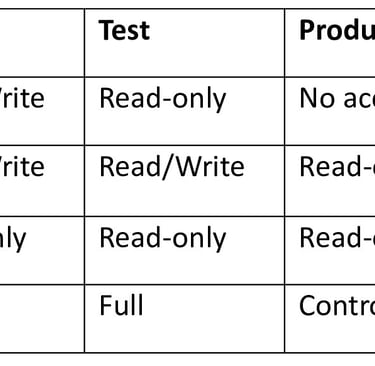
Subsection 6.2: Application Permission Mapping
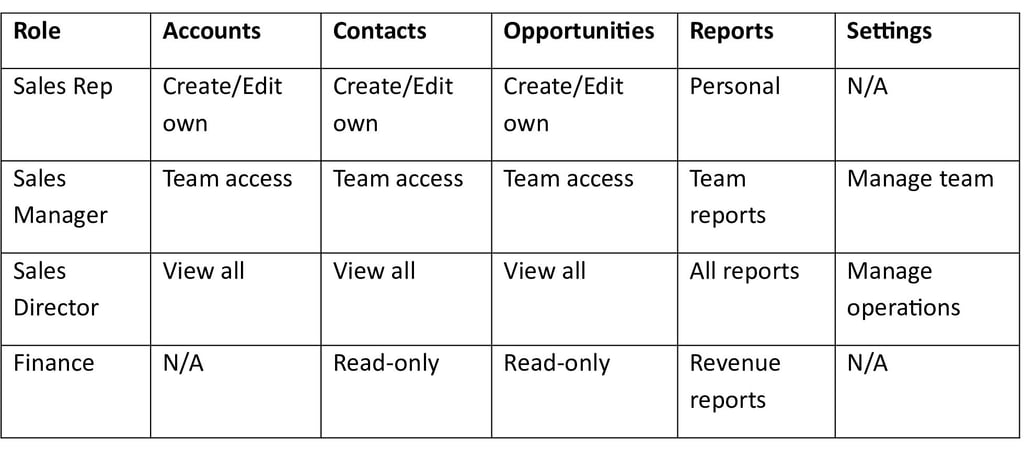
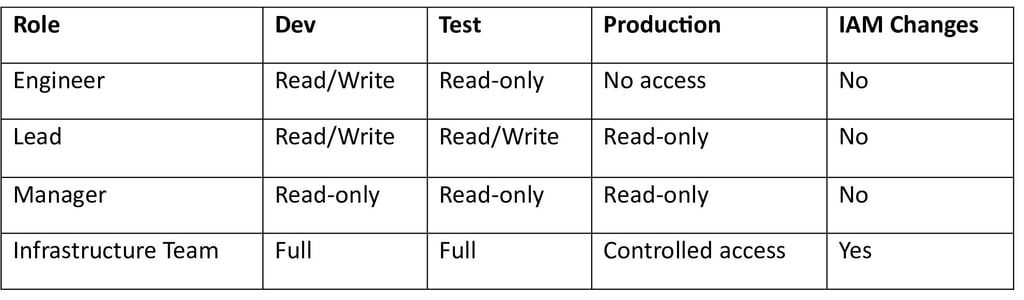
After defining roles, permissions must be mapped within each application. This ensures consistency across systems and prevents privilege creep.
Example: Salesforce Permission Mapping
Example: AWS Permission Mapping
Subsection 6.3: Role Implementation and Testing
Step 1: Pilot Testing
Before full deployment, test roles with a pilot group of 50–100 users representing different departments and seniority levels.
Key Validation Questions
Can users complete their work effectively?
Are there missing permissions?
Are there unnecessary permissions?
Is the role structure intuitive?
Typical pilot results:
85% correct access
10% minor gaps
5% minor over-permissions
Step 2: Refinement
Use pilot feedback to fine-tune roles.
Common refinements include:
Adding missing applications
Removing unused permissions
Adjusting permission levels
This step dramatically reduces future access issues.
Step 3: Production Rollout
Roll out RBAC in phases, department by department.
Assignment methods include:
Automated role assignment from HR job titles
Manager approval workflows
Self-service role requests
Manual IT assignment for exceptions
Phased rollout reduces disruption and improves adoption.
Subsection 6.4: Ongoing Role Management and Maintenance
RBAC is not a “set and forget” solution. Continuous maintenance is essential.
Quarterly Role Reviews
Review roles every quarter to ensure alignment with:
Organizational changes
New job functions
Application updates
Compliance requirements
Managing Permission Drift
Over time, roles tend to accumulate unnecessary permissions. Regular reviews help remove excess access and maintain least privilege.
Handling Exceptions and Delegation
Occasionally, exceptions are necessary—such as contractors or temporary project roles.
Best practices include:
Manager-approved temporary access
Documented justification
Automatic expiration dates
Periodic review of all exceptions
Exceptions should remain rare and tightly controlled.
SECTION 7: Conclusion & Action Plan


Building a Sustainable Identity & Access Management Program
Summarizing the IAM Journey
Identity & Access Management is not just a security technology—it is a long-term operational strategy. When implemented correctly, IAM transforms access control from a reactive, manual process into a proactive, intelligence-driven security framework.
Organizations that follow a structured IAM implementation roadmap—from planning and foundation to governance and optimization—consistently achieve measurable outcomes. These include a significant reduction in breach risk, stronger regulatory compliance, improved operational efficiency, and a positive return on investment, often within 18 to 24 months.
The real value of IAM lies in its maturity. Early phases focus on visibility and control, while advanced phases deliver automation, intelligence, and business agility. Each stage builds on the previous one, creating a security posture that scales with organizational growth and evolving threat landscapes.
Key Takeaways from Successful IAM Programs
IAM Is a Journey, Not a Destination
Identity and Access Management is not a one-time deployment. It is an ongoing, multi-phase program that evolves alongside your users, applications, cloud environments, and regulatory obligations. Threat actors adapt constantly, and IAM strategies must evolve just as fast.
A Phased Approach Delivers Results
Attempting to implement every IAM feature at once often leads to delays, complexity, and user resistance. A phased approach works best. Early wins such as Single Sign-On (SSO) and Multi-Factor Authentication (MFA) deliver immediate security improvements and demonstrate business value. Governance, automation, and optimization naturally follow once adoption is established.
People Matter More Than Tools
Technology alone does not guarantee success. Even the most advanced IAM platform can fail if users are confused, administrators are untrained, or leadership is disengaged. Change management, user education, and experience design are just as important as technical architecture.
One Size Does Not Fit All
IAM implementation timelines vary by organization size and complexity.
Small and medium-sized businesses (SMBs) can often deploy cloud-based IAM solutions within 3–4 months using lean teams.
Large enterprises typically require 12–18 months or more, supported by dedicated teams, integration partners, and vendor services.
Both approaches can succeed when aligned with business needs and risk tolerance.
Security and Compliance Move Together
A well-executed IAM strategy strengthens security while simultaneously simplifying compliance. Automated access controls, audit trails, and periodic access reviews reduce manual effort and help organizations meet standards across healthcare, finance, government, and global regulations.
Your Action Plan: What to Do Next
If You Are Just Starting with IAM
Begin by establishing a strong foundation:
Secure executive sponsorship and budget approval
Conduct an initial IAM assessment within 4–8 weeks
Develop a business case and phased roadmap in 4–6 weeks
Evaluate IAM solutions in parallel with planning
Launch the foundation phase focusing on quick wins like SSO and MFA
If You Are Mid-Implementation
Focus on scaling and governance:
Measure adoption and success of foundation controls (target 90%+ usage)
Transition to governance and lifecycle management
Implement role-based access control (RBAC)
Establish quarterly access reviews
Begin structured compliance evidence collection
If You Have a Mature IAM Program
Shift toward optimization and intelligence:
Assess maturity: Are you operating at a managed or advanced level?
Implement real-time monitoring and threat detection
Integrate IAM with SIEM and broader security operations
Plan next-generation capabilities such as passwordless access, AI-driven risk analysis, and continuous authentication
Commit to continuous improvement through metrics and optimization cycles
Final Thought
Organizations that implement Identity & Access Management systematically—following a phased roadmap, prioritizing people alongside technology, and sustaining commitment through maturity—turn identity into a strategic security asset rather than a compliance obligation.
Your users gain secure and seamless access.
Your data and applications remain protected.
Your compliance requirements are met with confidence.
Your IT operations become more efficient and scalable.
The alternative—relying on outdated access controls and fragmented identity systems—leads to higher breach costs, regulatory penalties, and operational inefficiency.
Choose the roadmap. Follow the phases. Implement with discipline.
The long-term value of IAM is proven, measurable, and sustainable.
👉 Subscribe and follow this channel to receive daily updates on the latest technology trends, cybersecurity insights, and practical IAM guidance designed for modern organizations.
Connect
Stay updated with us
Follow
Reach
+91 7044641537
© 2025. All rights reserved.